Friday, July 01, 2011

No Overflow for a Simple Math Calculation

I watched WebBeat podcast one day in the last month. One video show got my attention: Explaining visual math in a simple way. I wrote a blog on my Chinese blog. It is very interesting to resolve a math multiply by visualization graphs. However, this method only applies to multiply of 2 digit numbers, and it becomes tedious when there carrier forward in the last and middle numbers.

This reminds me a long time puzzle problem: how to resolve overflow issue when the result of multiply of two integers is too big. I recall the traditional method of multiply algorithm and relate it to this visualization. Soon I realize that I could resolve the overflow issue by creating a small app. I gave it a try with Javascript and I got it worked out! I am very happy with the result. No more overflow no matter how big numbers they are!

Here is my Javascript function:

function v1timesv2(v1, v2) {
  var x = ''; // result
  var i = 0;
  var j = 0;
  var r;
  var r1;
  var r2;
  var k;
  var tempVal;
  var preTempVal = '';
  debug ('v1: ' + v1);
  debug ('v2: ' + v2);
  for (i= v2.length-1; i >= 0; i--) // v2
  {
    r2 = 0;
    tempVal = '';
    k = preTempVal.length;
    for (j=v1.length-1;j >=0; j--)  // v1
    {
      if ((k--) > 0)
      {
        r2 += Number(preTempVal[k]);
      }
      r = v1[j] * v2[i] + r2;
      r1 = r % 10;
      r2 = 0;
      if ( r > 9 )
      {
        r2 = (r - r1) / 10;
      }
      tempVal = r1 + tempVal;
    }
    if ( r > 9 )
    {
       tempVal = r2 + tempVal;
    }
    debug('intermediate calculated result: ' + tempVal);
    // Get the last char as result
    x = tempVal[tempVal.length - 1] + x;
    debug('intermediate result: ' + x);
    // Get the remaining as previous val
    if ( tempVal.length > 1 )
    {
      preTempVal = tempVal.substr(0, tempVal.length - 1);
    }
    else
    {
      preTempVal= '';
    }
    debug('== carry forward result: ' + preTempVal + ' ==' );
  }
  x = preTempVal + x;
  debug('>>final result:    ' + x);
  debug('>>verified result: ' + Number(v1) * Number(v2) + ' (' + v1 + ' x ' + v2 + ')');
  return x ;
}


This may not be the best codes. Please let me know if you can simplify my codes. Download my numberCalc.html and drop it to a browser. I challenge if you can break my codes with an overflow!


References


Read More...

Saturday, June 25, 2011

CoffeeScript and .Net Nancy Framework

Last week when I listened to my podcasts, two projects got my attention. The firs one is from HerdingCode podcast 114 about: Trevor Burnham on CoffeeScript. This is light language in clean syntax that can be compiled into JavaScripts, in one to one relationship.

The second one is from HansellMinutes on 6/16/2011: Nancy, Sinatra and Exposion of .Net Micro Web Framewor. The Nancy project was introduced on Nov 28th, 2010. The blog site Elegent Code posted a blog about this podcast as well on Jun 28, 2011.

Read More...

Thursday, June 23, 2011

WWDC 2011 Videos Available for Apple Developers

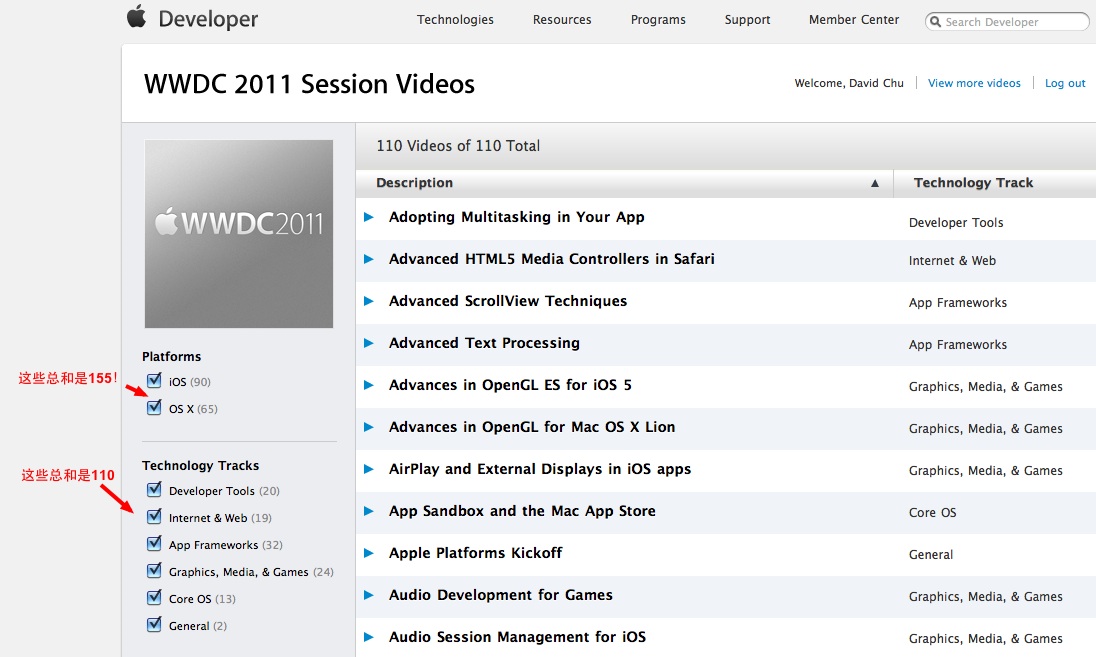
According to the news from AppleInsider, Apple released all the WWDC videos for Apple Mac OS and iOS developers. I went to the Apple Devleoper site and I started to download videos right away. There are about 110 videos in various categories. Based on OS X and iOS there are 155 contents.

The following image is one I used in my Chinese blog at creaders.net.


I have been anxiously expecting for those session videos for a while. Now I will be very busy to watch those videos, evenings and weekends. Last year I took months to finish all of WWDC 2010 videos, and I enjoyed watch them very much. Apple's OS and iOS technology are really very impressive.

References

Read More...

Friday, June 17, 2011

Edit Blogger HTML Settings

This is blog is technical detail I did in 2007. I wrote this technique long time ago. It is truth that this is only required to do only once. However, when I create another blogger account, I would like to repeat it again. Now I think it is better to take detail notes of steps so that I may need to reuse it again.

Here is the example I edited HTML for my Chinese blog.

Backup HTML


It is important to backup your Blogger HTML settings before doing any updates. Here is the place to find the HTML settings and make the complete copy of HTML before any updates.


Copy My CSS Settings


The following CSS codes are used by my blog. Insert the CSS definitions into header section. Here I copied it to end of </b:skin>

<b:skin><![CDATA[/*-----------------------------------------------
...
/* David Inserted styles */
/* Use these styles as class ID for a box for some blocks such as div, p */
.outlinebox {
  width: 435px;
  border-width: 1px;        /* sets border width on all sides */
  border-style: solid;
  border-color: #666666;
  padding: 5px
  }

.outlineterminalbox {
  width: 850px;
  border-width: 1px;        /* sets border width on all sides */
  border-style: solid;
  border-color: #C0C0C0;
  font-family:monospace, prestige;
  background-color: #080808;
  color: #FFFF00;
  padding: 5px
  }

.outlinebox4wrappercodes {
  width: 444px;
  border-width: 1px;        /* sets border width on all sides */
  border-style: solid;
  border-color: #666666;
  margin: 0px auto;
  }

.outlineboxterminal4wrappercodes {
  width: 444px;
  border-width: 1px;        /* sets border width on all sides */
  border-style: solid;
  border-color: #080808;
  color: yellow;
  margin: 0px auto;
  }

/* code settings with following 2 outline Withbackclr. Generated in VIM TOhtml cmd */
.Type { color: #60ff60; }
.Comment { color: #80a0ff; }
.Identifier { color: #40ffff; }
.PreProc { color: #ff80ff; }
.Constant { color: #ffa0a0; }
.Statement { color: #fbf204; }
.Special { color: #fb8000; }

.outlinebox4wrappercodesWithbackclr {
  width: 444px;
  border-width: 1px;        /* sets border width on all sides */
  border-style: solid;
  border-color: #666666;
  margin: 0px auto;
  background-color: #000000;
  color: #cccccc;
  }

.outlineboxterminal4wrappercodesWithbackclr {
  width: 444px;
  border-width: 1px;        /* sets border width on all sides */
  border-style: solid;
  border-color: #080808;
  color: yellow;
  margin: 0px auto;
  background-color: #000000;
  color: #cccccc;
  }
 
.wrappercodes {
  width: 435px;
  padding: 5px;
  overflow: auto;
  }
 
.wrappercodesWithHeight {
  width: 435px;
  height: 300px;
  padding: 5px;
  overflow: auto;
  }

.wrappercodesWithHeightNowrap {
  width: 435px;
  height: 300px;
  padding: 5px;
  overflow: auto;
  white-space:nowrap;
  }

.nowrappercodes {
  width: 435px;
  padding: 5px;
  overflow: auto;
  white-space:nowrap;
  }

.nowrappercodesinner {
  width: auto;
  padding: 5px;
  overflow: auto;
  white-space:nowrap;
  }

.nowrappercodesWithHeight {
  width: 435px;
  height: 300px;
  padding: 5px;
  overflow: auto;
  white-space:nowrap;
  }
 
/* code style */
span.kwrd {
  color: rbg(0, 0, 255);
  }

span.defType {
  color: rgb(43, 145, 175);
  }
 
span.errorcode {
  color: rbg(255, 0, 0);
  }
 
span.highlight
{
color: white;
background-color: rgb(0, 100, 200);
}

/* Code Colors copied ccs from http://forums.asp.net/utility/colorcode.css for code colors */
/* Use asp.net forums on-line post to generate codes with these ccs class */

.coloredcode .cmt      { color: #00D502; }
.coloredcode .cmtg      { color: #666; }
.coloredcode .st           { color: #f00; }
.coloredcode .kwdt      { color: #666; }
.coloredcode .kwd      { color: #00f; }
.coloredcode .attr      { color: #f00; }
.coloredcode .attrv      { color: #00f; }
.coloredcode .ec           { color: #00f; }
.coloredcode .tag      { color: #800000; }
.coloredcode .dir    { color: #000; background: #FEFF22; }
.coloredcode .sel    { color: #800000; }
.coloredcode .val    { color: #00f; }
.coloredcode .unit      { color: #800000; }
.coloredcode .sqlcmt { color: #008080; }
.coloredcode .sqlkwd { color: #00f; }
.coloredcode .sqlkwd2 { color: #f0f; }
.coloredcode .sqlkwd3 { color: #999; }
.coloredcode .sqlkwd4 { color: #800000; }
.coloredcode .num      { color: #00f; }
.coloredcode .sqlst  { color: #008000;}
.coloredcode .classInterface { color: #1E90FF;}
.coloredcode b      { font-weight: normal; color: #008080; }
.coloredcode          { font-size: small !important; }
.row-set-descriptor {
  border-bottom: 1px solid #F60;
  border-bottom-style: solid;
  border-bottom-width: 1px;
  border-bottom-color: #F60;
  clear: left;
  color: #E55C00;
  font-size: 140%;
  margin: 0px 20px 0.5em 0px;
  margin-top: 0px;
  margin-right: 20px;
  margin-bottom: 0.5em;
  margin-left: 0px;
  padding: 1em 0px 0.2em 0em;
  padding-top: 1em;
  padding-right: 0px;
  padding-bottom: 
}

 /* End of Code Colors */
 /* End of David inserted styles */

]] > </b:skin>


Copy Scripts


Immediately after about </b:skin>, add Javascript codes.

<b:skin>
  ...
]] > </b:skin>
<script type='text/javascript'>
function toggleIt(id) {
  var post = document.getElementById(id);
  if (post.style.display != &#39;none&#39;) {
    post.style.display = &#39;none&#39;;
  }
  else {
    post.style.display = &#39;&#39;;
  }
}

function showFullPost(id) {
  var post = document.getElementById(id);
  var spans = post.getElementsByTagName(&#39;span&#39;);
  for (var i = 0; i != spans.length; i++) {
    if (spans[i].id == &quot;fullpost&quot;)
      spans[i].style.display = &#39;inline&#39;;
    if (spans[i].id == &quot;readmore&quot;)
      spans[i].style.display = &#39;none&#39;;
  }
}

function showFull(id) {
  var post = document.getElementById(id);
  var spans = post.getElementsByTagName(&#39;span&#39;);
  for (var i = 0; i != spans.length; i++) {
    if (spans[i].id == &quot;fullpost&quot;)
    spans[i].style.display = &#39;inline&#39;;
    if (spans[i].id == &quot;showlink&quot;)
      spans[i].style.display = &#39;none&#39;;
    if (spans[i].id == &quot;hidelink&quot;)
      spans[i].style.display = &#39;inline&#39;;
  }
}

function hideFull(id) {
  var post = document.getElementById(id);
  var spans = post.getElementsByTagName(&#39;span&#39;);
  for (var i = 0; i != spans.length; i++) {
    if (spans[i].id == &quot;fullpost&quot;)
      spans[i].style.display = &#39;none&#39;;
    if (spans[i].id == &quot;showlink&quot;)
      spans[i].style.display = &#39;inline&#39;;
    if (spans[i].id == &quot;hidelink&quot;)
      spans[i].style.display = &#39;none&#39;;
  }
  post.scrollIntoView(true);
}

function checkFull(id) {
  var post = document.getElementById(id);
  var spans = post.getElementsByTagName(&#39;span&#39;);
  var found = 0;
  for (var i = 0; i != spans.length; i++) {
    if (spans[i].id == &quot;fullpost&quot;)
      found = 1;
    if (spans[i].id == &quot;showlink&quot;)
      if (found == 0)
        spans[i].style.display = &#39;none&#39;;
  }
}
</script>


Insert Script Function Calls in Body Section


MODIFYING BLOG POSTS CODES

First find the line: <div class='post-header-line-1'/>

Insert the following codes after it:

<div class='post-body'>
  <b:if cond='data:blog.pageType == &quot;item&quot;'>
    <p><data:post.body/></p>
    <div style='clear: both;'/>
  <b:else/>
    <style>#fullpost {display:none;}</style>
    <p><data:post.body/></p>
    <span id='showlink'>
      <p>
        <a expr:onclick='&quot;javascript:showFull(\&quot;post-&quot; + data:post.id + &quot;\&quot;);&quot;'
        href='javascript:void(0);'>读详细内容(Read More)...</a>
      </p>
    </span>
    <span id='hidelink' style='display:none'>
      <p>
        <a expr:onclick='&quot;javascript:hideFull(\&quot;post-&quot; + data:post.id + &quot;\&quot;);&quot;'
        href='javascript:void(0);'>Collapse...</a>
      </p>
    </span>
    <script type='text/javascript'>
      checkFull(&quot;post-&quot; + &quot;<data:post.id/>&quot;);
    </script>
  </b:if>
</div>


NOTE: I found there is a duplicate post when the title of the post is clicked. The reason is that there is another div after the above codes:

<div class='post-body entry-content' expr:id='&quot;post-body-&quot; + data:post.id'>
  <data:post.body/>
  <div style='clear: both;'/> <!-- clear for photos floats -->
</div>


delete this section of div to avoid duplications.

NOTE: remove two tags: <div class="post-header"> ... </div> to avoid the content of post content in grey.

CODE FOR THE INCLUDABLE

Find the code: <b:includable id='feedLinksBody' var='links'>
Insert the following codes above it:

<b:includable id='PeekABooPost' var='post'>
  <div class='post uncustomized-post-template'>
    <table><tbody>
      <tr><td>
        <h3 class='post-title'><a expr:href='data:post.url'
        title='View this post only (comments visible).'><data:post.title/></a></h3>
      </td></tr>
      <tr><td>
        <a expr:onclick='&quot;javascript:toggleIt(\&quot;&quot; + data:post.id + &quot;\&quot;);&quot;'
          href='javascript:void(0)'
          style='text-decoration:none'
          title='Expand/collapse this post (comments not visible)'>[+/-] 显示内容(Show/Hide This Post).</a><br/>
        <a expr:href='data:post.url' target='_blank'>
          <i><font size='-2'>See/leave comments for this post in another window/tab.</font></i></a>
      </td></tr>
    </tbody></table>
    <div class='post-body' expr:id='data:post.id' style='display:none'>
       <p><data:post.body/></p>
       <div style='clear: both;'/>
    </div>
  </div>
</b:includable>
<b:includable id='feedLinksBoday' var='links'>


INCLUDE THE INCLUDABLE IN THE POSTS WIDGET

Find the code: <b:includable id='main' var='top'>
In this section find: <b:include data='post' name='post'/>
Change it to:

<b:if cond='data:blog.homepageUrl == data:blog.url'>
  <b:if cond='data:blog.pageType != &quot;item&quot;'>
    <b:include data='post' name='PeekABooPost'/>
  <b:else/>
    <b:include data='post' name='post'/>
  </b:if>
<b:else/>
  <b:include data='post' name='post'/>
</b:if>


Copy HTML Back to Blogger HTML Settings


After the change, copy the content of HTML from your local file back to blogger HTML settings.

REFERENCE

This feature of shrink and expend bloggs is based on this blog.

Read More...

Saturday, June 11, 2011

My SQL Query Questions

Last Friday I posted a SQL query question to SO. It was about get records between boundaries. Quickly I got several good answers.

I noticed one comment about performance issue by Piotr Auguscik:

U can use max/min to get value u need. Order by +top 1 isnt best way to get max value, what i can see in ur querys. To sort n items its O(n to power 2), getting max should be only O(n)


This is very interesting comment. I think about it, and I realize it is true. To sort a list of n items, it will take about n power of 2 by using bubble sort algorithm; while just to find out the max, it will do one loop of n at most. This is a very simple computer science concept. However, if it is an index column in the query table, I think that it should have no difference between TOP 1 + ORDER BY and MAX + GROUP BY.

Today I raised another question related to this issue again to SO. I got a very nice explanation and a tip to optimize the query and tip on how to turn on statistics on IO and TIME.

Here are queries:

SELECT
dv1.timestamp, dv1.value
FROM
myTable AS dv1
WHERE
dv1.value = @value
dv1.timestamp
BETWEEN (
SELECT TOP 1 dv2.timestamp
FROM myTable AS dv2
WHERE dv2.value = @value AND
dv2.timestamp < '@START_DATE'
ORDER BY dv2.timestamp DESC
)
AND (
SELECT TOP 1 dv3.timestamp
FROM myTable AS dv3
WHERE dv3.value = @value AND
dv3.timestamp < '@END_DATE'
ORDER BY dv3.timestamp ASC
)
ORDER BY dv1.timestamp

-- alternative way

SELECT
dv1.timestamp, dv1.value
FROM
myTable AS dv1
WHERE
dv1.value = @value
dv1.timestamp
BETWEEN (
SELECT MAX(dv2.timestamp)
FROM myTable AS dv2
WHERE dv2.value = @value
GROUP BY dv2.value
)
AND (
SELECT MIN(dv3.timestamp)
FROM myTable AS dv3
WHERE dv3.value = @value
GROUP BY dv3.value
)
ORDER BY dv1.timestamp

Read More...

Thursday, June 02, 2011

Use NET USE Command to Map Network Drive

Here is one senario about using network shared folders. One application requires a configuration file. The application has been used in our intranet environment with many users. Many users use the same configuration. It is preferable to put the configuration file on a shared network folder. I need to find a efficient way to let user be able to access to the file.

I use the following DOS command NET USE to dynamically allocate a network drive for the share one:

@IF EXIST \\remoteMachine\sharedFolder GOTO EXIT
@NET USE * \\remotemachine\sharedFolder pwd /user:userName /PERSISTENT:NO
:EXIT


In above codes, * is used to get next available drive letter for mapping. The key option is /PERSISTENT:NO. With this setting, the mapped drive will be released or not persistent after logout or reboot.

The main reason I use dynamic mapping is that I am not sure what network drive is available. It hard to find one no body in use. Since my application does accept UNC network full name, I don't care what network letter being assigned. In the configuration file, I use UNC network full name. Since the UNC name has been authenticated, it is as same as a drive letter for fast access.

Read More...

Sunday, May 22, 2011

Create Shortcut in C#

Last week I was working on a case to provide support for an application users. The application has two executables: one is app's main exe like app.exe and another one is for app's update like appUpdate.exe. For this update, we need to add a shortcut on clients machine desktop pointed to appUpdate.exe.

Like a typical shortcut, the one I need to put on client PCs has several settings: target, start in, run mode, icon and comments.


I tried to create a shortcut on my box first. Aftert that, I tried to copy this shortcut file (lnk) to a remote PC. It did not work. It seems that the lnk file some information are embedded in the file. When it is not in the machine where it was created. The machine name appears in the target.

I need a way to create a shortcut on fly. That's why I went to .net to create a simple console app do the job. This time SO helped me with an excellent open source library from a QA: ShellLink.cs. Within the source codes, there are actually two files I need: ShellLink.cs and FileIcon.cs. The library contains a wrapper class for Windows APIs. It is very straight forward.

The only change I made is to add a class level flag for any changes in shortcut properties. If any setter changes a value, this flag is true. Then I'll only save chances for the shortcut if any of properties are changed.

public class ShellLink : IDisposable {
private bool mChanged = false;
....
public string Target {
get { .... }
set { if (!value.Equals(Target)) {
mChanged = true;
....
}
....
}

Read More...

Sunday, May 15, 2011

Evernote Shared Link

Evernote is one of my favourite web services. I have taken a lots of notes about my programming experience and snip of codes. Recently Evernote announced that it adds public link to any private notes, as well as public ones. That's nice feature.

Here is one note I made last week about my experience to use console command to make to a network shared folder. With this tip, I can control the accessibility of sub folders. This node is from my public notebook: .Net

To test sharing of private note, here is my private note about Mac OS tip: Fix Failed Install.

Read More...

Sunday, May 08, 2011

Sina Blog

Let me continue to explain the Chinese web services. Today it is about blog. Sina provides a wide range web services. Sina blog is one of the most popular blog services in China. From its blog main page, you will see rich contents. The most interest area in the main page is the rank of bloggers.

For example, the number 1 for the current time is Xu Xiao Ming. He is so hot that his visits and followers will blow you away comparing to most western bloggers:


and Hanhan was the number one for many years. He is the most controversial person in China. He is so popular is mainly for this critics and sharp thoughts about government and current issues. He is still 8th in the rank.

Those top ones have most influence in Chinese, especially in young people. In Chinese followers or fans are called as fensi, which is a new word based on phonetic. It is interesting to see so many new words coming out almost every day. For Chinese absence just one year, they will don't know many new words when they come back. Chinese fensi love to read their their favourite blogs. It is interesting to read a long list of comments. As well, Sina provides a list of statistics about each blog, such reads, comments, forwards (copy to bloggers' blog) and favourites.


Most people just jump to their accounts to write or view blogs. On the top of Sina blog, there are some convenient links or menu items for accessing other sina services, as well as blog settings:


There is a list of menu items for personal information:


Writing blog is also very convenient. The on-line blog has a rich list of formats, photos, and videos, as well other options:


For uploading photos, you can only upload up to 20 photos per blog. Photo and video insert tool icons have other options such as reuse previous ones and web links.

Read More...

Sunday, May 01, 2011

Web Services for Chinese Blog and Twitter

In the past couple months I have spent many hours and effort to write Chinese blogs and twitters. Chinese is my mother language so it is natural for me to write. I know there are many web services to provide features and services specially for Chinese years ago. I even registered my account in two most popular ones, creaders.net and sina.com. However, I have spent rarely much time there. The main reason to switch my attention to those Chinese web sites was the time I went back to China last Christmas time vacation.

One thing got my attention is that almost every one in China with mobile phones have QQ. QQ becomes an alternative way to communicate. QQ's provider is a company called Tencent. Like Google and Twitter, QQ was started as a hobby app for people to communicate based on MSN text message. Soon it got Chinese people attention, and it spread out allover China. With so much people on QQ everyday, now Tencent have already attract many investors and it has been doing very well financially as well.

When I was surprised by Tencent success, I was told that Tencent was actually losing market in the blogger and twitter services in Chinese. Sina was and now is the biggest blog and twitter, or weibo in Chinese, in China. Since I already had account at Sina, I gave it a try when I was in China. I have continued my blog and weibo since then. The market is so hot there. I see that many famous people like celebrities, politicians, economic scholars, popular public speakers, naming just a few of types of people, have millions followers. Each time when they post any blog, news or a phrase, they reach to people instantly. Several times of comments, forwards, and favourites happen afterwards. I was joke to one CNet tech person, who is very active in new tech review and podcasts. I told her that if she was in weibo, she would have 100 times of followers. Unfortunately, none of western hot-people know Chinese.

Anyway, the reason I write my Chinese blogs and weibos are my exploration of web in this global environment. Now the English is not dominate language on the web. Actually, if you know another or more languages, you have great advantages over other people. For example, my weibo followers are about 55, while my twitter (@chudq) has only 18. The visits to my sina blog up to today are 2494, creaders blog are 8174. I have my principle to join those services, not just to attract people or pursue number of followers. I want to write my own idea, experience and tips, in one word: sharing. The followers are actually the people have the similar interest.

In terms of features, all Chinese web services are pretty good. For example, all Chinese blog web providers have nice editors with tones of tools for layout format. One most nice feature is HTML source code editing. I can almost write any HTML codes in my blog. This makes my control much easier. Weibo is similar as twitter. You can forward tweet, comment tweet, and group your followers. You can write private messages. The most popular feature is to add pictures and videos with tweet.


As you can see, pictures worth thousand words. With this feature, you can do your message more effectively. There are so much there. Most westerns don't know what is happening in Chinese Web services. Many webs are blocked and that's reality. However, in terms of freedom and dynamics, people are more active and I can see that Chinese people are very happy with what they have now. The media is not the correct picture. Personally speaking, I think western media give westerns wrong picture about China.

Read More...

Tuesday, April 26, 2011

My StackOverflow Reputation Over 2K

Finally today My SO reputation points are over 2K, 2008. It is a lucky number. Actually, I have not actively raised or answered any questions recently. I just keep checking my SO site and watching some questions there. That's why my points grow very slow.


Another interesting feature of SO is that you can subscribe to some user's feed to see user's activity. It is specially beneficial to following some awesome gurus. For example, I subscribed to user bbum, who is very good in ObjC and iPhone development.

Read More...

Sunday, April 17, 2011

Why is DI important?

In the past week, I was asked by this question. Most people use OO strategy to write their codes. Each class or object has its encapsulated private data member and methods. They do try to separate business logic clear and narrow down only the jobs the class cares. What is Dependency Injection(DI) and why do we use DI?

I asked a similar question to another senior developer, "where do you use DI?" He told me that he only uses it in unit test as mocked objects to avoid real access to database. That's very common in unit tests. However, that's not enough. Actually DI is a very important concept and should be a common practice in our daily coding.

I recalled my previous projects and went through the pattern I used. Here is my further explanation. Take the following codes as example:

public class MyDataReader {
...

public bool ReadData() {
var dbService = new MyDbService();
....
var data = dbService.GetObject();
....
}
}


The question code is the place where dbService object is created. How many times we have seen this type creation in our classes. The class MyDataReader has dependency on MyDbService class. In other words, it knows what db service class to use. Does MyDataReader class need to know that? Isn't that better if separate this specific logic from MyDataReaer?

Now look at the following updated codes:

public class MyDataReader {
...

public bool ReadData() {
var dbService = DIContainer.GetInstance<IDBService>();
....
var data = dbService.GetObject();
....
}
}


The only change is that MyDataReader does not have knowledge of what concrete db service is any more. It passes the job to a container class to get an instance of db service which implements the interface of IDBService. If you make changes in the container, then the instance you want to be used will be able to inject to MyDataReader class. You don't need to change MyDataReader class at all. This is a typical case of DI.

By implement DI pattern, your class will be truly OO. Less coupling is a critical principle of OO. You should always to use DI container as much as possible to separate the relationship between concrete classes. To do DI coding, you do need to create your container class and following your pattern to register the relationship between interface and class.

Fortunately, there are many great DI patterns available. I wrote blogs on Structure Map and MEF. Those are great DI Containers. For sure, you need to learn those patterns and ways they require, but I think it is worthwhile. Write better and clean codes will benefit you and your applications.

Read More...

Sunday, April 10, 2011

Two Useful Excel Functions

I often use Excel as a tool for some tests or data analysis. For example, last week I tried to comparing two columns in data base to see their difference. I found out that I had an Excel as a tool to do that. This file contains some formula for column comparison. Here is summary what I did for my future reference.

First, I copied column from table 1 to a worksheet(table1), and another column from table 2 to another worksheet(table2). Then I added a formula like this in column B:

=MATCH(A2, Table1!A2:A2409, 0)


MATCH function is useful to find first parameter value from the second parameter array, and the third parameter 0 is used to find a match. The result will be the index in the array if item is found, or #NA if nothing is found.

The result will be index number or #NA. I prefer to view the result as true or false. ISNA() is a function for this purpose.


above are snapshots of NeoOffice at my iMac.

Read More...

Saturday, April 02, 2011

Broken MSCOMRT2.OCX Caused Excel Add-in Exception

Last week I spent almost two days to resolve one issue. Excel add-in throw exceptions after an enterprise application update was installed. This happened initially in a product our team supports. The product is from a third party application suite by company C, where one Excel add-in is part of.

The symptom of the issue is that when Excel is opened, an exception is displayed right away. This one is caused by an add-in provided by the company C.


I contacted with the company which provides support the product. What they did was to remove monthview control from the add-in. It did not cause Excel error after that, however, I realized that this was not the right way to resolve the issue. The monthview is a common control from VB 6.0 control. Soon I found this control is MSCOMRT2.OCX, and there are some plains about its broken.

Soon I got calls from other department about the similar exceptions in Excel. They use different add-in and I realized that the root is to fix the control. After many discussions with other team member, I narrowed my focus on this control. I was right on this issue. I found a fix from Microsoft support knowledge base. The fix contains a cab file with only those two files:

mscomct2.inf
mscomct2.ocx


What I did was unregister the ocx file in %systemroot%/system32 first,


Then I copy those files to the path and register the ocx:


The fix seems very simple. However, at first no one knows the root of the issue. The update deployment team was afraid of the update would cause many user apps not working. I think the team work and web search played important role to get down the solution. Based on our communications on the issues and information we got, I finally found the right package as a fix.

Read More...

Thursday, March 24, 2011

FireFox Update (4.0) and Vimperator 3.0

My favorite web browser Firefox has been updated to 4.0. I got it today. After the installation, I found that my must-have adding Vimperator has also been updated to 3.0. The new interface for Vimperator looks nice; however, my clean UI is changed. All the toolbar, navigation bar, bookmark bar and tags are visible. I would like only tabs visible.

The command to display UI bars is different. In its help page, it still says that the following command is for displaying UI bars:

  :set go+=mTB

I thought I could use it to disable UI bars. There is no go settings in this new version. What I found is that the following command can be used to hide all:

  :set gui=none
:set gui=tabs

The first one is to disable all UI bars and the next one is for displaying tabs bar.

Other than that, I have not found anything changed in terms of features, except some minor changes in UI. For example, the command line displays a triangle instead colon (:). Vimperator works great!

Read More...

Saturday, March 19, 2011

VIM Tip: Add Syntax file for svg graphics

Today I found a graphics from Wikipedia about stomach. The graphics is a svg file, which is actually in XML. I like this type of graphics since it is a graphics in XML format. It makes it very easy to change some parts, specially some words in the graphics. I use VIM to edit the file.

stomach diagram.svg

Get the Syntax File

However, my MacVIM does have syntax file. I quickly found it from VIM web site, svg.vim. I saved it to my Desktop.

Copy svg.vim to Syntax Directory

According to VIM web svg.vim instruction, this file should be copied to VIM syntax directory first. At my Mac, I open my Terminal and copy the file to my vim syntax directory. My VIM's syntax directory is at ~/.vim/syntax/, where some other syntax files are, such as ps1.vim for PowerShell scripts and m.vim for Objective-C.

MyMac:~ userMe$ cp ~/Desktop/svg.vim ~/.vim/syntax/


Add a Line to filetype.vim

The next step is to add a line to my VIM's filetype.vim file. This file is located at my local vim directory:

MyMac:~ userMe$ vi ~/.vim/filetype.vim

In my vi editor, a line is added:

" my filetype file
if exists("did_load_filetypes")
finish
endif
augroup filetypedetect
au! BufRead,BufNewFile *.ps1 setfiletype ps1
au! BufRead,BufNewFile *.m setfiletype objc
au! BufNewFile,BufRead *.svg setfiletype svg
augroup END

Load syntax file From .vimrc

The above change seems OK, but I found that I also have a line in my vim configuration file to load the syntax files. The configuration file is ~/.vimrc, where syntax files are loaded. I added a line for svg:

" Load syntax source from file
source ~/.vim/syntax/ps1.vim
source ~/.vim/syntax/svg.vim

After that, restart my VIM and I'll syntax for the svg file I want to edit:


I should say that I would not need to do above steps to edit svg files by using VIM. However, it would be nice to have correct syntax highlighting if it is available. Finally I used my VIM to edit the svg file and changed texts from English to Chinese:


Reference

See my previous blog on VIM Syntax Settings.

Read More...

Wednesday, March 09, 2011

XCODE4.0 is Out!

Two days before iPad 2 release, today Apple released iOS4.3 for iPhone4 & iPad, as well as massive updates(I wrote a blog today about those items). The most expected XCODE 4.0 is released. I can be purchased from Mac Apple Store at $4.99, unbelievable low price comparing to Microsoft Visual Studio ($799 from MSRP for Professional version to $3,799 for Ultimate). For registered Apple Developers($99 annual fee), it is FREE!

However, this is the first time Apple charges a fee for XCODE. Mac users get XCODE with Mac computer for free. By default is not installed. It is an optional item on CD for most Mac computers, except MacBook Air(with OS X on USB). I got Air last year and I installed XCODE from my iMac CD. It runs without any problems.

I have watched many WWDC 2011 videos from iTunes. I am very impressed by XCODE 4.0 architecture and development. This is the one I am going to get soon when I have time in coming weeks. Here are some pictures of XCODE 4.0


Read More...

Saturday, March 05, 2011

Migration of Web Sites from IIS6 to IIS7

This note is about my experience to move a web site project from IIS6 to IIS7. The project was developed in ASP.Net in VS 2005. The requirement is to move the web site from one Windows box to another one. The only difference is IIS.

At first, I just copied all the files from IIS6 box to another box. That's the way normally I deploy a web site. However, after the set up on the new box in the same file and web site configuration, the new web site got exception when I tried to access to it from IE. After about one hour exploration, I found that it was caused by a http setting in my web.config. Rick Strahl's blog has one comment on this issue: HttpModule and HttpHander Sections in IIS 7 web.config files.

As Rick said, "you've probably seen the IIS 7 Exception that lets you know that in Integrated mode in IIS 7 you are not supposed to have an httpModules or httpHandlers section", however, my case web.config is different. The following http section caused the exception:

<add path="Reserved.ReportViewerWebControl.axd" verb="*" 
type="Microsoft.Reporting.WebForms.HttpHandler, Microsoft.ReportViewer.WebForms, Version=8.0.0.0, Culture=neutral, PublicKeyToken=b03f5f7f11d50a3a"
validate="false"/>


After I comment it out, the web site on IIS 7 is OK. This is my note on this issue. I think Rick's view is related to the migration from IIS 6 to IIS 7.

Read More...