Showing posts with label Swift. Show all posts

Wednesday, April 09, 2025

A Conversation with ChatGPT

Recently, I had a very good conversation with ChatGPT about a topic that often goes unnoticed: how to name a variable in a Swift class in my iOS app. This isn't the kind of question you typically search for on Google or post on StackOverflow (where you might have to wait a day or longer for a response). Yet, I was stuck trying to find a meaningful name—one that clearly conveys its purpose and is easy to recognize later during maintenance.

My Initial Question

ChatGPT came to mind. I explained why I needed this variable, and with some context, I hoped it would suggest a good name. Here's my original question:

I have a main view with some tab bars, such as Edit, Tap, and Report. The main view is the starting point. I would like to define an enum type to indicate where the starting point is, for example, TabBarStatus. I also like to define a variable for the status. What names should I use for the enum and variable? The variable will be used in subsequent views to find out where the start view is.

Less than a second later, ChatGPT responded with a thoughtful explanation and code examples.

For your use case, where you want to track which tab was the starting point (Edit, Tap, Report, etc.), defining an enum and a variable to hold that state is a great approach. Here's a naming suggestion that is clear, consistent with Swift/iOS conventions, and scalable:

🧩 Enum Name

Use a descriptive enum name that reflects the context:

  1. enum MainTab {
  2.  case edit
  3.  case tap
  4.  case report
  5. }

Alternative names:

  • StartTab
  • MainTabType
  • TabBarStatus (your suggestion, but slightly less Swift-like)

Swift style prefers concise, noun-based enum names like MainTab or StartTab.

🧩 Variable Name

For a variable that stores the starting tab, here are a few clean suggestions:

  • startingTab: MainTab
  • originTab: MainTab
  • entryTab: MainTab
  • launchTab: MainTab
  • startFromTab: MainTab (if used in routing context)
✅ Example Usage
  1. enum MainTab {
  2.  case edit
  3.  case tap
  4.  case report
  5. }
  6. struct ViewModel {
  7.  var startingTab: MainTab
  8. }

My Follow-Up

Just like talking to a senior developer, I continued the conversation and explained more about the context and how this variable would be used:

Good. Another question I need your advice on. All main view controllers and subsequent view controllers (VCs) are based on a base view controller, BaseViewController: UIViewController. All the subsequent VCs are presented as detail views, modal views, etc. I would like to define a public variable in BaseViewController, and its value is set in the main view controllers. I think this var should be static, instead of an instance variable. The reason is that there is only one starting tab. Right?

I was hoping ChatGPT could offer a better design based on my explanation. To my surprise, ChatGPT not only understood my design but also laid out a solid analysis of how the design could be improved.

ChatGPT's instant reply

Great question—and you're thinking in the right direction! Let's break it down and figure out the best approach.


🧠 Your Goal

You want all view controllers (which inherit from BaseViewController) to know where the user started (i.e., which main tab). There's only one starting tab per app session, and this info is set by the main view controller.


✅ Static vs Instance Variable
  • Static variable (static var or class var) is shared across all instances of BaseViewController. Perfect for global, app-wide state.
  • Instance variable (var) is unique to each instance, so you'd need to pass it manually to every view controller—probably not what you want here.

👉 Since there's only one starting tab, and you want all view controllers to access the same value, a static variable is the right choice.


✅ Suggested Implementation
  1. class BaseViewController: UIViewController {
  2.  // Default value, set from main controller
  3.  static var startingTab: MainTab = .tap
  4. }

Then, in your main tab view controllers (e.g. EditViewController, TapViewController, etc.), you set it like this:

  1. override func viewDidLoad() {
  2.  super.viewDidLoad()
  3.  BaseViewController.startingTab = .edit  // or .tap or .report
  4. }

And any other view controller can read it like:

  1. let origin = BaseViewController.startingTab


✅ Optional: Make It a Computed Property (if you want read-only from others)
  1. class BaseViewController: UIViewController {
  2.  private static var _startingTab: MainTab = .tap
  3.  public class var startingTab: MainTab {
  4.    get { return _startingTab }
  5.    set { _startingTab = newValue }
  6.  }
  7. }

Let me know if you also want to persist this value (e.g. between launches) or just keep it in-memory for one app session.

A Better Design

During this very natural and productive conversation, three concepts caught my attention: state, persistence, and computed property. They suddenly lit up my thinking like a flash of inspiration. A new design came to mind, and I shared it with ChatGPT:

There may be some cases where a subsequent view is not inherited from BaseViewController. I think it may be better to define a static class, such as MainTabStatus (or maybe a better name?). Within the class, a private var _startingTab and a public computed property startingTab can be used to manage the starting tab status. This class can be extended to include mechanisms to store the status in memory or user settings (persisting across app launches). This helper class can then be accessed from any view controller, view, or class to retrieve the starting point status.

Very quickly, I got feeback from ChatGPT.

Yes, that’s a great idea—and a cleaner and more modular design! Creating a dedicated MainTabStatus (or similarly named) helper class decouples the logic from your view controllers entirely, making it more flexible, easier to test, and extendable for future needs (like persistence).


✅ Suggested Design
  1. enum MainTab {
  2.  case edit
  3.  case tap
  4.  case report
  5. }
  6. final class MainTabStatus {
  7.  private static var _startingTab: MainTab = .tap  // default value
  8.  public static var startingTab: MainTab {
  9.    get { return _startingTab }
  10.    set { _startingTab = newValue }
  11.  }
  12.  // Optional: Save to UserDefaults if needed
  13.  public static func persist() {
  14.    UserDefaults.standard.set(_startingTab.rawValue, forKey: "StartingTab")
  15.  }
  16.  public static func restore() {
  17.    if let raw = UserDefaults.standard.string(forKey: "StartingTab"),
  18.       let tab = MainTab(rawValue: raw) {
  19.          _startingTab = tab
  20.    }
  21.  }
  22. }

🔧 For the UserDefaults part to work, you'd make MainTab conform to RawRepresentable (usually with String), like this:

✅ Suggested Design
  1. enum MainTab : String {
  2.  case edit
  3.  case tap
  4.  case report
  5. }

✅ Usage in Any View Controller

Set at startup:

  1. MainTabStatus.startingTab = .edit

Read anywhere:

  1. let origin = MainTabStatus.startingTab

Restore from UserDefaults (if persisted):

  1. MainTabStatus.restore()

🧠 Alternative Names for MainTabStatus

If you want something shorter or more Swift-y:

  • AppNavigationContext
  • StartContext
  • OriginTab
  • TabTracker
  • MainTabTracker

MainTabStatus is already clear, so it's a solid choice.


Let me know if you'd like this helper to also handle notifications (e.g., broadcast when tab changes), or if you want a sample using @AppStorage (SwiftUI), too!

Wow! What a great set of suggestions from ChatGPT—starting from a simple question about naming a variable, and evolving into a much better and scalable design.

Other Blogs

Read More...

Thursday, March 28, 2024

Scope Not Shown When Search Bar Is Activated

Recently, I noticed a minor issue after updating iOS. The scope bar did not appear when the search bar was activated. Typically, I prefer to display the scope bar simultaneously with the search bar activation. This allows users to select a scope item before searching.

An Example Case

Here is a snapshot. When I pull down the screen, only the search bar is displayed, but the scope bar is missing.


The scope bar appears when text is entered into the search bar. However, if a user selects a scope item, the search text disappears. This means that the user has to re-enter text if they selecte a different scope item. This is very inconvenient.


Solution

I spent some time thinking about the issue before diving into my project. It became apparent that there were some logic or behavior changes in iOS. Soon, I discovered that a property of the search bar had been deprecated and a new property was recommended as its replacement.

  1. private func configSearchControll() {
  2.  let sc =  UISearchController(searchResultsController: nil)
  3.  // config search controller
  4.  if #available(iOS 16.0, *) {
  5.        sc.scopeBarActivation = .onSearchActivation
  6.    } else {
  7.        if #available(iOS 13.0, *) {
  8.            sc.automaticallyShowsScopeBar = true
  9.        } else {
  10.            // Fallback on earlier versions
  11.        }
  12.    }
  13. }

I noticed that the deprecated property of automaticallyShowsScopeBar is a boolean type with only one choice. With the iOS update, the recommented property of scopeBarActivation is an enum type with several options. After further testing, I found that only the enumerator onSearchActivation is meeting my requirements.


The above method is called in the event of viewDidLoad.

  1. override func viewDidLoad() {
  2.  super.viewDidLoad()
  3.  // some configuration codes
  4.  DispatchQueue.main.async {
  5.    [weak self] in
  6.      guard let this = self else { return }
  7.      this.configSearchController()
  8.  }
  9. }

With above code updated, my iOS app TapMyNotes now works as expected!


I'll update my app TapMyNotes on the App Store with this bug-fix, as well as other new and exiting features, soon!

References

Read More...

Wednesday, May 17, 2023

Xcode 14.3 and Navigation Bar Issue

Recently, I encountered a very frustrating crash issue in my iOS app. After I updated my Xcode to version 14.3, my app suddenly crashed right at the launch time. I could not find where the crash occurred, even thought I set a break point at the very beginning of my project code.

I posted a question with my case on StackOverflow two days ago. That's the place where I normally try to get help from other talent developers around the world. The next day, I got two comments, which gave me direction on where to do further investigation.

Quickly, I found the place where the exception was raised and finally found a solution to resolve the issue! To cut a long story short, I put my question, my solution, and my findings about the issue in the hyperlink of my references.

References

Read More...

Tuesday, April 17, 2018

Pace Calculation in Swift

I need to add a new feature to show pace in my iOS App(TapToCount -3W). By given two dates and two locations as input, the pace can be easily calculated in the formula:

pace = duration / distance

Duration

In swift the duration can be obtained in following codes:


// dt1 and dt2 are Date types
let timeInterval = dt2.timeIntervalSince(dt1)

The func timeIntervalSince call will return seconds as time interval between two days.

Distance

The distance between two locations is obtained

// loc1 and loc2 are CLLocation type
let dist = dist2.distance(from: dist1)

where dist is the distance value in meters.

Support Localization and Accessibility

It seems that the pace calculation is so simple to get. Hold on. iOS provides APIs to support metric or imperial measurement system. It would be nice to get pace calculation result either in metric or imperial system. This can be easily detected by the following codes.


let locale = NSLocale.current
let metricSystem = locale.usesMetricSystem

In my iOS app, I presented the pace calculation result in human readable format. For example, 6'34" would be "6 min, 28 secs".

Further more, the pace result may be in hours, or even years, depending on inputs of dates and locations. My pace calculation is more generic to support a wide range of cases. To obtain readable result, it can be done by using Swift codes:


1 let fm = DateComponentsFormatter()
2 fm.allowedUnits = [.year, .day, .hour, .minute, .second]
3 fm.unitsStyle = .short
4 let short = fm.string(from: value)
5 fm.unitsStyle = .full
6 let full = fm.string(from: value)

The allowedUnits property specifies what readable units should be used. Here is the complete units from seconds to years, and only first none zero value's unit will be presented, for example, 2 hrs, 15 min, 23 secs. This example is in a short form. There is no need to worry about languages. The API will do the localization automatically. Very nice!

The short form is good for UI presentation. The full form will spell out whole units, such as "2 hours, 15 minutes, 23 seconds". This would be great for accessibility support, for example, label's accessibilityValue. The localization for full form is done automatically as well.

I tested this pace calculation in my iOS app. The following is the screenshot of my mountain hiking, Ha Ling Peak, last Sunday.


and this is my running result today when I was doing my test.


and here is one more test I did. I changed the iPhone language to Traditional Chinese.


You may notice that when the pace result is in years or long days, the last units minute and second are dropped out, since such small amount is so insignificant.  The complete codes are available in my answer in StackOverflow discussion.

References


Read More...

Friday, August 04, 2017

Self-reference and clousure

Here is a great short video explaining reference type and how to properly use it in closure by Brain's How to Build That App in YouTube.


Read More...

Thursday, May 04, 2017

Xcode and Swift Tips and Tricks

During my development of my iOS app, I have encountered some hurdles. Even though some of them are small ones, I did spend a lots of time to find solution to overcome them. Here are some in my past short period.

Can't find customized class from Storyboard


Normally customized view controller classes are used to handle specific requirement for some views. In Storyboard, this customized class can be specified in Storyboard right property panel "Show the identity inspector" tab.

For whatever reason, I may pressed space bar by chance in the area of Module. This caused the Module's value as None! As a result, I got this run time error:

Could not cast value of type 'UIViewController' (0x113f1b798) to 'MyProject.MyViewController' (0x113985200).

I spent hours trying to figure out why. Eventually, I found out the simple solution: change the module to my project.

This is what I had in my Storyboard for this customized class setting:


Hide Tabbar and use toolbar


In a tabar driven app, sometimes, I may need to hide tabbar and show a toolbar as alternative. To hide tabar for next view controller, it can be done in prepare(for segue: sender:) event.

  1. override func prepare(for segue: UIStoryboardSegue, sender: Any?) {
  2.  ...
  3.  let vc = segue.destination
  4.  // call vc's hidebottombar
  5.  vc.hidesBottomBarWhenPushed = true
  6.  ...
  7. }

For the case of normal view controller, bar button item can be directly added to the bottom of the view. For the case of tableview controller, in order to show bar button item on the bottom, a toolbar has to be used to encapsulate bar button items. This can be done in storyboard.

However, it seems that there is no API or method to let vc to show or hide toolbar. At first, I found a solution to show or hide toolbar by adjusting toolbar y position in viewWillAppear event. The problem is that if user changes device from portrait to landscape, the toolbar will be off screen, disappeared. As a result, I have to adjust toolbar y position in the event of viewRotated.

To adjust toolbar y position, I add the following API to view controller as extension. This makes it easier in call this API to show toolbar.

  1. extension UIViewController {
  2.  func setToolBarShow(show: Bool, delay: Double = 2) {
  3.    if let toolbar = self.navigationController?.toolbar {
  4.      let newOriginY = UIScreen.main.bounds.height - toolbar.bounds.size.height
  5.      if toolbar.frame.origin.y != newOriginY {
  6.        toolbar.frame.origin.y = newOriginY
  7.      }
  8.      if delay > 0 {
  9.        // Make sure origin is set correctly
  10.        DispatchQueue.main.asyncAfter(deadline: .now() + delay) {
  11.          if toolbar.frame.origin.y != newOriginY {
  12.            toolbar.frame.origin.y = newOriginY
  13.          }
  14.        }
  15.      }
  16.    }
  17.  }
  18. ...
  19. }

Here the trick to show toolbar in the events of viewDidAppeared and viewRotated is to delay adjusting toolbar y position. It seems that in both events, without delay, toolbar would not show. It may be something inside UIKit would not seeing this adjustment. With delay, the toolbar would show correctly at the bottom of the view.

Change navigation back button's title


In the case of parent VC to child VC by using navigation controller, the top-left button is used to pop off child VC and back to parent VC. The title of this button is by default the title of the parent VC. If the parent title is too long, it may make top text too crowded if the title of child VC is too long. One simple way to change top-left button title to "Back". This can be done by clearing parent title before pushing to child VC. UIKit will automatically use "Back" as the title.

Here is the solution to do that: clear view's title when pushing a new view controller. This can be done in the event of prepare() for segue.

One thing to remember is that to set view's title on the event of viewDidAppear(), otherwise, the view's title would be blank if the view is pushed back.

Resources


Read More...

Saturday, March 04, 2017

Localization Experience in Swift Project

When I tried to jump into localization for my app, I thought it would be a simple job. Actually, I have encountered several hurdles during this progress. Here I would like to make some notes about issues I had experienced.

Bomb! Unexpected Exception


I started to add supporting to two sets of Chinese(my native language): mainly string files such as .strings, and .stringsdict files. This can be done by clicking on Localization button on the right Utilities panel in Xcode. By enabling localization, Xcode would move the English string or plist file from project root into en.lproj folder, and creating other language folders for localized resources, for example, zh-Hant.lproj for Simplified Chinese.

One thing I noticed is that plist file also has Localization section in Xcode right Utilities panel. I thought this could be localized and I did see some settings in some plist file requiring localization. Then I tried to localize plist file together. That's a mistake. See the following sections.


I have a long list of resource files. I spent about 2 days to finish localization for my project. With all the resource files ready, I stared to compile my project and tried to start my test on Simulator. Bomb! I saw this exception right away.


That's really bizarre exception. What does it mean by "Invalid argument"? It does not provide any detail clue about the exception. I had to try internet search to find out if any other people experienced the same issue.

No Solutions Anywhere


Soon I found out this is a common issue for some Swift developers and some suggestions were provided. Unfortunately, I tried all the solutions provided, but I could not resolve this exception in my case. Two days passed, I was really in struggle stage and with no clue to fix the issue.

With no way to get out, I stood back for a moment. With so many changes in my codes, I might mess up somewhere in my project. Instead of finding a way out of the maze, what I could do is to move my project back to the previous working version and redo the localization again. This was the last and difficult choice because I did not want to give up my localization effort.

Roll Back to Previous Working Version


I decided to discard all the changes in my codes from Source Control (fortunately, I have kept doing source code repository by using Xcode Source Control feature) and rolled back to previous version. This time, I started to do one change, and then compiling my project and running my app on Simulator at a time. In this way, I could figure out where the exception would be. I was also very careful coding localization to avoid any error causing unnecessary changes in my project.

I started from my app's settings, i.e, my app name, location privacy description, and app settings, where some localizations are required. I was so lucky that I soon located the issue which caused the exception.

Don't Localize info.plist


[app_name]-info.plist is a project property file, where project settings specific to my app are defined. For simplification, I call this info property file as info.plist in this blog. I need to localize my app display name and location privacy description in this plist.

In Xcode, all string files and plist files can be localized by clicking on Localize... button in Localization section on right Utilities penal.


When a resource file is localized, the English version file is moved from project root to en.lproj folder, and other localized files are created under corresponding language folders, for example, zh-Hans.lproj is the folder for Simplified Chinese resource files.

The problem is that info.plist file would be missing from project root if it were localized. The compile and installation processes require info.plist at project root. Actually, there is a resource file infoPlist.strings for info.plist localization purpose!

To verify this, I discard my changes again. For my working version, I found Identify section in my project settings (select my app as target, in General tab):


However, the same setting would be like as follows if the info.plist is localized.


Even I tried to locate the info.plist file from Choose button, I could not locate it from the dialog window.


Don't Localize Plist?


While I am writing this blog, I realize that none of plist files in my project require localization directly. Further exploration of the APIs Apple provides for localization, all strings files are automatically localized without any reference to device local settings from API interface calls. However, to load a plist, it seems that you have to specify a path for the plist file.

I remember that when I initially added a localization language to my project, from Info tab in project settings:


I saw a prompt dialog for adding new language for only two items: infoPlist.strings, which is for info.plist, and MainStoryboard.storyboard.


For info.plist file, Xcode provides corresponding infoPlist.strings file for localization. In my project, another place where a plist file is used is for my app default settings.

Localization of App Default Settings


The app default settings are defined in a bundle file: Settings.bundle, where a plist file Root.plist, which for default settings, and an English localization strings file within en.lproj folder, are created by Xcode at the time when the project was initially created.


To localize default settings for another language, a language folder and strings file have to be created manually(as in above zh-Hans.lproj and zh-Hant.lproj). The reason is that the plist file and strings files are within the bundle file and there is no Localization section in the right Utilities panel for adding new languages.

I found out that in order for settings working for any other languages, do not remove one item in Root.plist file: Strings Filename and its value as Root.


I had trouble to make default settings working while I was making changes in Root.plist file. I did not understand the usage of that item and removed it from the plist when I tried to clean up default settings. I was tumbled by this mistake. Anyway, it is a good experience and I now fully understand its importance.

References


Read More...

Friday, February 24, 2017

Enable Localization for Swift Project

My app is closing to finish stage. One feature I would like to have is to enable localization. Spending about hours exploration, I found the way to enable localization for my Swift project in Xcode 8.2.1.

The localization has to be set at project level. Open project settings first. Enable level panel and make sure to select project, you will find Localization section in Info section.

Then press + to add languages you like to support.


After this feature enabled, you may get prompt to enable localization for string, default plist and other localizable items. You can also click on Localizations in high panel for some resource files to add localization.

Read More...

Monday, November 07, 2016

Playground and Testing Subquery by NSExpression (3)

In order to apply more than one fetch conditions on each of a subset property, I think that I can still use Subquery to do that. For my test example, friends property is a collection and it can be used as the first parameter in a Subquery. In this way, the predicate, the third parameter in the Subquery, can apply more than one fetch conditions on each friend.

Nested Subquery


Fortunately, it is possible to build a nested Subquery expression. The result of a Subquery is an array(may be empty). By using NSExpression's function count, the second or nested Subquery can be placed in a Subquery expression's third parameter predicate: Subquery(...).@count > 0 as an example.

Thereafter, it comes my nested Subquery test:

TestSubquery.TestNestedSubquery(nameContains: "L", birthYearLowLimit: 2010, friendsLevel: 1)

and the result is as follows:

  1. Creating Person object and friends...
  2. Person - name: Bob, birthYear: 1997
  3.    Friend - name: Tony, birthYear: 2010, friends: (none)
  4.    Friend - name: Lisa, birthYear: 2012, friends: (none)
  5. Collection expression: {<MyPlayground_Sources.Person: 0x618000070700>}
  6. Collection expression result value: (
  7.    "<MyPlayground_Sources.Person: 0x618000070700>"
  8. )
  9. Person - name: Bob, birthYear: 1997
  10. Predicate: SUBQUERY($x.friends, $y, $y.name CONTAINS "L" AND $y.birthYear > 2010).@count > 0
  11. Subquery Expression: SUBQUERY({<MyPlayground_Sources.Person: 0x618000070700>}, $x, SUBQUERY($x.friends, $y, $y.name CONTAINS "L" AND $y.birthYear > 2010).@count > 0)
  12.  collection: {<MyPlayground_Sources.Person: 0x618000070700>}
  13.  variable: x
  14.  predicate: SUBQUERY($x.friends, $y, $y.name CONTAINS "L" AND $y.birthYear > 2010).@count > 0
  15. Subquery expression result value: Optional(<__NSArrayM 0x60800005f8f0>(
  16. <MyPlayground_Sources.Person: 0x618000070700>
  17. )
  18. )
  19. Subquery expression value as [Person]: [<MyPlayground_Sources.Person: 0x618000070700>] as follows
  20. Person - name: Bob, birthYear: 1997
  21.    Friend - name: Tony, birthYear: 2010, friends: (none)
  22.    Friend - name: Lisa, birthYear: 2012, friends: (none)

It is so fun to test Subquery in Playground!

One-to-many Relationships to More Than One Levels


With above knowledge about Subquery expression, we may use powerful Subquery expression to go to deep more than one level of one-to-many relationships. For example, we may query persons with constrains on the second level of friends, i.e., friends' friends.

TestSubquery.TestNestedSubquery(aggregate: .none, nameContains: "a1", checkFriendsNull: true, friendsLevel: 2)

The above test applies aggregate operator NONE on the second level friends property of person Bob, i.e., friends' friends. Here are printed out debug information, as-expected:

  1. Creating Person object and friends...
  2. Person - name: Bob, birthYear: 1997
  3.    Friend - name: Tony, birthYear: 2010
  4.      Friend - name: Tony1, birthYear: 2012, friends: (none)
  5.      Friend - name: Lisa1, birthYear: 2011, friends: (none)
  6.    Friend - name: Lisa, birthYear: 2012, friends: (none)
  7. Collection expression: {<MyPlayground_Sources.Person: 0x60000007fa00>}
  8. Collection expression result value: (
  9.    "<MyPlayground_Sources.Person: 0x60000007fa00>"
  10. )
  11. Person - name: Bob, birthYear: 1997
  12. Predicate: SUBQUERY($x.friends, $y, $y.friends != nil AND (NOT ANY $y.friends.name CONTAINS "a1")).@count > 0
  13. Subquery Expression: SUBQUERY({<MyPlayground_Sources.Person: 0x60000007fa00>}, $x, SUBQUERY($x.friends, $y, $y.friends != nil AND (NOT ANY $y.friends.name CONTAINS "a1")).@count > 0)
  14.  collection: {<MyPlayground_Sources.Person: 0x60000007fa00>}
  15.  variable: x
  16.  predicate: SUBQUERY($x.friends, $y, $y.friends != nil AND (NOT ANY $y.friends.name CONTAINS "a1")).@count > 0
  17. Subquery expression result value: Optional(<__NSArrayM 0x618000059fb0>(
  18. )
  19. )
  20. Subquery expression value as [Person]: [] as follows

empty array because none of friends' friends Lisa1 contains "a1".

Updates


Important findings! Recently (2017.02.21) I found an issue or restriction with Subquery. All the objects in Subquery have to be key-value-coding-compliant, that is, all the objects have to be based on NSObject.

In other words, object from none NSObject based class such as struct would cause exception or crash when calling method expressionValue(with: context:). Subquery would not be able to figure out any methods without implementing key-value-observation(KVO) protocol. I spent almost more than one day to figure this issue out.

Resources


Read More...

Wednesday, October 26, 2016

Playground and Testing Subquery by NSExpression (2)

My next test is to use Subquery expression to test a one-to-many case. A person may have some friends. My search is to find a person whose friends at least one's birth year is greater than 2011. For this case, the operator any can be used. I have defined an aggregation enumerate type for using operators:

  1. public enum AggregateType: String {
  2.  case any = "any"
  3.  case all = "all"
  4.  case none = "none"
  5. }

By the way, I found in my test that in Subquery, the operator NONE is actually NOT ALL.

One-to-many Relationship Test


Here is my test in Playground:

TestSubquery.TestSubquery(aggregate: .any, birthYearLowLimit: 2011, friendsLevel: 1)

One of Bob's friend Lisa was born in the year of 2012. Therefore, the expected result Bob is found:

  1. Creating Person object and friends...
  2. Person - name: Bob, birthYear: 1997
  3.    Friend - name: Tony, birthYear: 2010, friends: (none)
  4.    Friend - name: Lisa, birthYear: 2012, friends: (none)
  5. Collection expression: {<MyPlayground_Sources.Person: 0x600000262040>}
  6. Collection expression result value: (
  7.    "<MyPlayground_Sources.Person: 0x600000262040>"
  8. )
  9. Person - name: Bob, birthYear: 1997
  10. Predicate: ANY $x.friends.birthYear > 2011
  11. Subquery Expression: SUBQUERY({<MyPlayground_Sources.Person: 0x600000262040>}, $x, ANY $x.friends.birthYear > 2011)
  12.  collection: {<MyPlayground_Sources.Person: 0x600000262040>}
  13.  variable: x
  14.  predicate: ANY $x.friends.birthYear > 2011
  15. Subquery expression result value: Optional(<__NSArrayM 0x600000055240>(
  16. <MyPlayground_Sources.Person: 0x600000262040>
  17. )
  18. )
  19. Subquery expression value as [Person]: [<MyPlayground_Sources.Person: 0x600000262040>] as follows
  20. Person - name: Bob, birthYear: 1997
  21.    Friend - name: Tony, birthYear: 2010, friends: (none)
  22.    Friend - name: Lisa, birthYear: 2012, friends: (none)

I tested other two operators(all and none). The results are all empty array(of Person). That's expected.

Need to Check Friends Collection?


What happens if Bob has no friends? I thought. I immediately did the following test with friendsLevel to 0:

TestSubquery.TestSubquery(aggregate: .any, birthYearLowLimit: 2011, friendsLevel: 0)

The result is as expected, empty array. However, to my surprise, I got Bob in an array of [Person] for both ALL and NONE operators:

  1. Creating Person object and friends...
  2. Person - name: Bob, birthYear: 1997
  3. Collection expression: {<MyPlayground_Sources.Person: 0x60000006aec0>}
  4. Collection expression result value: (
  5.    "<MyPlayground_Sources.Person: 0x60000006aec0>"
  6. )
  7. Person - name: Bob, birthYear: 1997
  8. Predicate: ALL $x.friends.birthYear > 2011
  9. Subquery Expression: SUBQUERY({<MyPlayground_Sources.Person: 0x60000006aec0>}, $x, ALL $x.friends.birthYear > 2011)
  10.  collection: {<MyPlayground_Sources.Person: 0x60000006aec0>}
  11.  variable: x
  12.  predicate: ALL $x.friends.birthYear > 2011
  13. Subquery expression result value: Optional(<__NSArrayM 0x60000005e960>(
  14. <MyPlayground_Sources.Person: 0x60000006aec0>
  15. )
  16. )
  17. Subquery expression value as [Person]: [<MyPlayground_Sources.Person: 0x60000006aec0>] as follows
  18. Person - name: Bob, birthYear: 1997

I am not sure if this is a bug in Subquery. Still I don't know how the implementation is done within the predicate. To guarantee the result is correct, I think that further checking if friends being nil is needed. My tests are updated with additional parameter to check friends so that the predicate contains checking if friends being nil.

TestSubquery.TestSubquery(aggregate: .all, birthYearLowLimit: 2011, checkFriendsNull: true, friendsLevel: 0)

The test result is prefect, as-expected if checkFriendsNull parameter is set to true. All tests for other two operators are also correct.

  1. Creating Person object and friends...
  2. Person - name: Bob, birthYear: 1997
  3. Collection expression: {<MyPlayground_Sources.Person: 0x618000069200>}
  4. Collection expression result value: (
  5.    "<MyPlayground_Sources.Person: 0x618000069200>"
  6. )
  7. Person - name: Bob, birthYear: 1997
  8. Predicate: $x.friends != nil AND ALL $x.friends.birthYear > 2011
  9. Subquery Expression: SUBQUERY({<MyPlayground_Sources.Person: 0x618000069200>}, $x, $x.friends != nil AND ALL $x.friends.birthYear > 2011)
  10.  collection: {<MyPlayground_Sources.Person: 0x618000069200>}
  11.  variable: x
  12.  predicate: $x.friends != nil AND ALL $x.friends.birthYear > 2011
  13. Subquery expression result value: Optional(<__NSArrayM 0x608000056b30>(
  14. )
  15. )
  16. Subquery expression value as [Person]: [] as follows

More on One-to-many Relationship Test


The above test has only one condition on friends' birthYear property. How about to add one more condition on property name containing something?

Here is a test with two conditions:

TestSubquery.TestSubquery(aggregate: .any, nameContains: "T", birthYearLowLimit: 2011, checkFriendsNull: true, friendsLevel: 1)

The result of the test is as follows:

  1. Creating Person object and friends...
  2. Person - name: Bob, birthYear: 1997
  3.    Friend - name: Tony, birthYear: 2010, friends: (none)
  4.    Friend - name: Lisa, birthYear: 2012, friends: (none)
  5. Collection expression: {<MyPlayground_Sources.Person: 0x60800007f5c0>}
  6. Collection expression result value: (
  7.    "<MyPlayground_Sources.Person: 0x60800007f5c0>"
  8. )
  9. Person - name: Bob, birthYear: 1997
  10. Predicate: $x.friends != nil AND ANY $x.friends.name CONTAINS "T" AND ANY $x.friends.birthYear > 2011
  11. Subquery Expression: SUBQUERY({<MyPlayground_Sources.Person: 0x60800007f5c0>}, $x, $x.friends != nil AND ANY $x.friends.name CONTAINS "T" AND ANY $x.friends.birthYear > 2011)
  12.  collection: {<MyPlayground_Sources.Person: 0x60800007f5c0>}
  13.  variable: x
  14.  predicate: $x.friends != nil AND ANY $x.friends.name CONTAINS "T" AND ANY $x.friends.birthYear > 2011
  15. Subquery expression result value: Optional(<__NSArrayM 0x618000051af0>(
  16. <MyPlayground_Sources.Person: 0x60800007f5c0>
  17. )
  18. )
  19. Subquery expression value as [Person]: [<MyPlayground_Sources.Person: 0x60800007f5c0>] as follows
  20. Person - name: Bob, birthYear: 1997
  21.    Friend - name: Tony, birthYear: 2010, friends: (none)
  22.    Friend - name: Lisa, birthYear: 2012, friends: (none)

The result seems correct, however, Bob's friend Tony was born in 2010, and another friend Lisa was born in 2012. If you look carefully at the logic of Subquery's predicate, the fetch conditions are done by ANY operator on friends subset separately, i.e., checking only on name on friends, and then only birth year on friends. It does not mean one of friends whose both name and birth year meet fetch conditions.

In my next blog, I'll continue to talk about how to find out that at least one of friend's both properties meed fetch requirement.

Resources


Read More...

Monday, October 24, 2016

Playground and Testing Subquery by NSExpression (1)

I am not sure when Playground was introduced to Xcode, may version 2? I started to use Playground when I moved to Xcode 3. As I mentioned in my previous blog, I would like to find out a better way to test Subquery.

It is very easy to add a Playground in iOS project in Xcode. However, it is hard to test CoreData in Playground. First, CoreData model is not easy to add to Playground, even though I eventually found a way to add CoreData context to Playground. Next difficulty is that I still cannot fig out how to add CoreData managed data classes to Playground. It seems that namespace between my project and Playground are different. I could change all my managed classes to public, but they are not visible nor accessible through CoreData fetch mechanism.

My purpose is to test Subquery. When I found out that Subquery can be built in NSExpression, I immediately think about Playground as a place to do my test.

Playground in Xcode


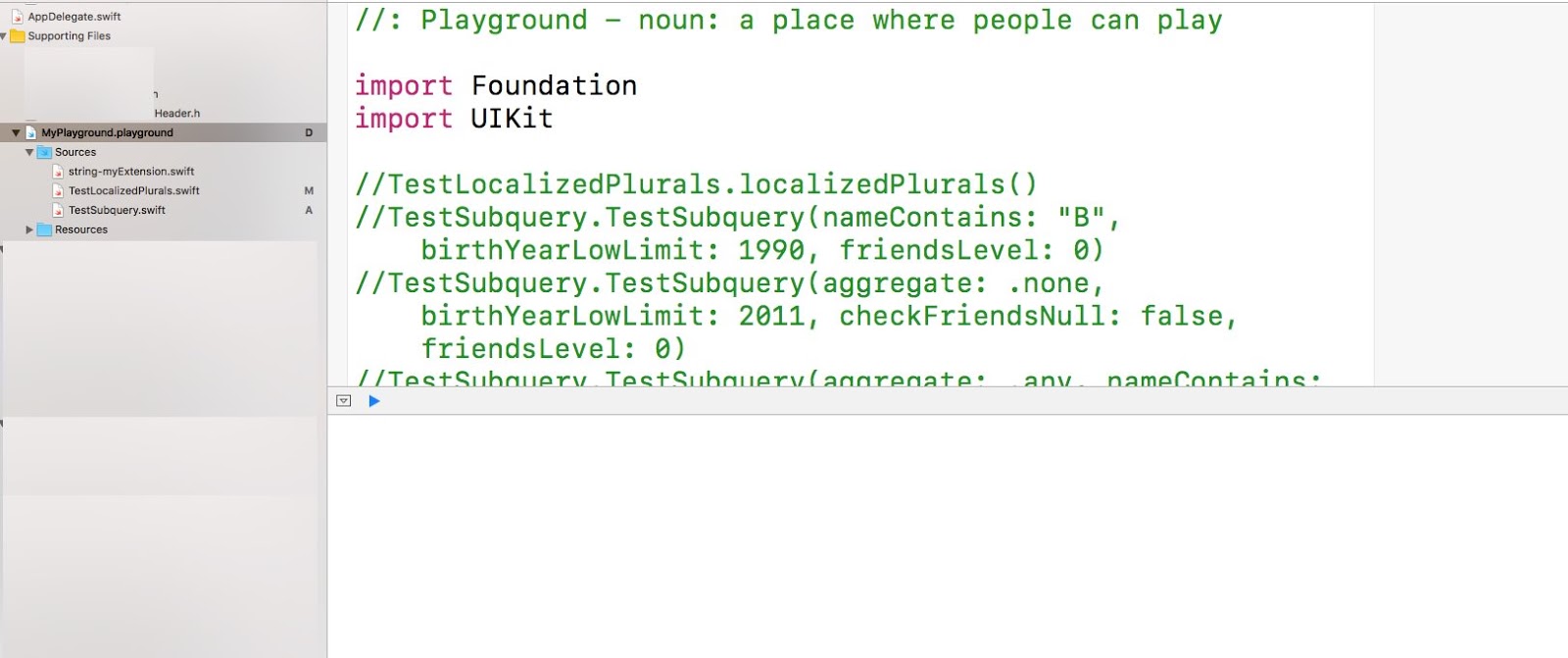
To add a Playground to Xcode project is very simple: just add a new file to Xcode project and then select Playground. By default, it is called as MyPlayground. There are two folders within the Playground: Sources for all swift source codes, and Resources for resource files.

The following is MyPlayground in Xcode left panel Project navigator view.


On the right panel, the left area on the top is an editable area for swift codes. The right side on the top is an area for immediate result view and the bottom is debug result view.


It is better to organize all the classes, extensions, enumerations and types in swift files under Sources folder. In order to access them from Playground, all the accessible elements have to be public.

During your start test stage, you may need to place all your classes and variables, types, and functions in Playground. In this way, any run-time errors would be highlighted during your test. When all those elements are OK, you can move them to a swift file under Sources folder.

Test Class


As I mentioned in my previous blog, the first parameter in Subquery is a collection of objects, defined by a class. What I found that there are some requirement for the class. First, the class has to inherit from NSObject which has hash code for equality. Secondly, if you need to use operator ALL, ANY, or NONE on collection properties defined in the class, the collection has to be NSSet type.

For my test, I defined the following Person class.

  1. public class Person : NSObject {
  2.    public var name: String
  3.    public let birthYear: Int
  4.    public var friends: NSSet?
  5.    init(name pName: String, birthYear year : Int) {
  6.        name = pName
  7.        birthYear = year
  8.        super.init()
  9.    }
  10. }

I created a swift file TestSubquery.swift in Sources folder. The Person class is defined there. This class is perfect data for Subquery's first parameter: collection. The class has two simple properties name and birthYear, and one collection property friends. In my test, only one person object is created and placed in an array as collection, which is used as the first parameter in Subquery.

friends property is optional NSSet type collection, where actually Person objects are hold or null if no objects. Each person in friends could have friends. In this way, nested friends could be used as many levels of one-to-many relationship for testing. The following is my help function(in TestSubquery.swift file as a module function) to create base data for my tests. The function takes one parameter to control levels of nested friends. I'll explain how to use this parameter to do some interesting tests later.

  1. func getPerson(friendsLevel: Int) -> [Person] {
  2.    print("Creating Person object and friends...")
  3.    let p = Person(name: "Bob", birthYear: 1997)
  4.    if friendsLevel > 0 {
  5.        let p1 = Person(name: "Tony", birthYear: 2010)
  6.        if friendsLevel > 1 {
  7.            let p1_1 = Person(name: "Tony1", birthYear: 2012)
  8.            if friendsLevel > 2 {
  9.                 let p1_1_1 = Person(name: "Tony1_1", birthYear: 2011)
  10.                 let p1_1_2 = Person(name: "Tony1_2", birthYear: 2012)
  11.                 p1_1.friends = NSSet(objects: p1_1_1, p1_1_2)
  12.            }
  13.            let p1_2 = Person(name: "Lisa1", birthYear: 2011)
  14.            p1.friends = NSSet(objects: p1_1, p1_2)
  15.        }
  16.        let p2 = Person(name: "Lisa", birthYear: 2012)
  17.        p.friends = NSSet(objects: p1, p2)
  18.    }
  19.    printPerson(personCollection: [p], printFriends: true)
  20.    return [p]
  21. }

Here is the complete debug information of person data structure (up to 2 levels of nested friends):

  1. Creating Person object and friends...
  2. Person - name: Bob, birthYear: 1997
  3.    Friend - name: Tony, birthYear: 2010
  4.      Friend - name: Tony1, birthYear: 2012
  5.        Friend - name: Tony1_2, birthYear: 2012, friends: (none)
  6.        Friend - name: Tony1_1, birthYear: 2011, friends: (none)
  7.      Friend - name: Lisa1, birthYear: 2011, friends: (none)
  8.    Friend - name: Lisa, birthYear: 2012, friends: (none)


In addition to that, I have added some other types and help functions, as well as a test class TestSubquery. Here I don't need to list all the codes for them. Only test codes will be provided and explained in the following sections.


The complete source code can be downloaded from a link in Resources section.

Test Structure


Subquery NSExpression will be used as an expression object for my tests. To build a Subquery expression, two things have to be prepared: a collection data or expression and a predicate. Therefore, all my tests are defined in the following structure or steps:


  1. get an expression of Person collection,
  2. create a predicate, and
  3. build a Subquery expression, finally evaluate the Subquery expression to get result.

Step 1 is very simple. The collection of Person is obtained from the function getPerson(...) as explained above. In step 2, a predicate is created by one of a list of help functions, which define interested fetch query conditions against to the collection of Person. Finally, it is time ready to build a Subquery expression and then to evaluate its result in step 3.

Let's look at a simple test func defined in TestSubquery class.

  1. public class TestSubquery {
  2. ...
  3.  public static func TestSubquery(nameContains: String, birthYearLowLimit: Int, friendsLevel: Int = 2) {
  4.    let e = getColletionExpression(friendsLevel: friendsLevel)
  5.    let predicate = getPredicate(nameContains: nameContains, birthYearLowLimit: birthYearLowLimit)
  6.    let expValue = getSubqueryExpressionResult(collection: e, predicate: predicate)
  7.    printSubqueryExpressionWith(result: expValue)
  8.  }
  9. ...
  10. }

At line 4, only one person with a name, birth year and a collection of friends (or null if no friends) is created as collection expression by the help func of getCollectionExpression. At line 5, a predicate with CONTAINS(string) function for name and low limit for birth year is obtained from the help func of getPredicate. With the data collection and predicate ready, at line 6, the help func of getSubqueryExpressionResult builds a Subquery expression and evaluates the result.


Test and Result


To better understand my test, extensive information are printed out in debug window. Here is one example of using above test func in Playground:

TestSubquery.TestSubquery(nameContains: "L", birthYearLowLimit: 2010, friendsLevel: 0)

and the debug information is as follows:

  1. Creating Person object and friends...
  2. Person - name: Bob, birthYear: 1997
  3. Collection expression: {<MyPlayground_Sources.Person: 0x60800007e940>}
  4. Collection expression result value: (
  5.    "<MyPlayground_Sources.Person: 0x60800007e940>"
  6. )
  7. Person - name: Bob, birthYear: 1997
  8. Predicate: $x.name CONTAINS "L" AND $x.birthYear > 2010
  9. Subquery Expression: SUBQUERY({<MyPlayground_Sources.Person: 0x60800007e940>}, $x, $x.name CONTAINS "L" AND $x.birthYear > 2010)
  10.  collection: {<MyPlayground_Sources.Person: 0x60800007e940>}
  11.  variable: x
  12.  predicate: $x.name CONTAINS "L" AND $x.birthYear > 2010
  13. Subquery expression result value: Optional(<__NSArrayM 0x610000046030>(
  14. )
  15. )
  16. Subquery expression value as [Person]: [] as follows

In this test result, line 1-7 explain that only one person "Bob" who is born in 1997 created as in a collection expression. The debug information at line 8 is the print-out during a predicate was obtained. From line 9-12 are information about building Subquery expression, and its three parameters: collection, variable and predicate. The information at remaining lines shows the Subquery expression evaluation result, and detail information as an array of Person or empty if no result.

If test is changed to name containing "B" and birth year greater than 1990, the person Bob will be in the result array:

  1. Creating Person object and friends...
  2. Person - name: Bob, birthYear: 1997
  3. Collection expression: {<MyPlayground_Sources.Person: 0x608000077fc0>}
  4. Collection expression result value: (
  5.    "<MyPlayground_Sources.Person: 0x608000077fc0>"
  6. )
  7. Person - name: Bob, birthYear: 1997
  8. Predicate: $x.name CONTAINS "B" AND $x.birthYear > 1990
  9. Subquery Expression: SUBQUERY({<MyPlayground_Sources.Person: 0x608000077fc0>}, $x, $x.name CONTAINS "B" AND $x.birthYear > 1990)
  10.  collection: {<MyPlayground_Sources.Person: 0x608000077fc0>}
  11.  variable: x
  12.  predicate: $x.name CONTAINS "B" AND $x.birthYear > 1990
  13. Subquery expression result value: Optional(<__NSArrayM 0x60800005cc50>(
  14. <MyPlayground_Sources.Person: 0x608000077fc0>
  15. )
  16. )
  17. Subquery expression value as [Person]: [<MyPlayground_Sources.Person: 0x608000077fc0>] as follows
  18. Person - name: Bob, birthYear: 1997

It is really fun to test Subquery expression in Playground.

Stay tuned for the power of Subquery expression and more interesting findings in my other tests.

Resources


Read More...

Friday, October 21, 2016

One-to-Many Relationship and Subquery

Recently I have to deal with a case in my app. In a one-to-many relationship, I need to define a predicate for many's element to be checked. Here taking Person as a simple class for example, as in following swift class:

  1. class Person {
  2.  var name: String?
  3.  var birthYear: Int?
  4.  var friends: NSSet?
  5. }

the Person class has three properties, name, birthYear, and friends. I use CoreData model to define Person entity. What I need to find a person whose has friends(at least one) and those friends has to meet certain criteria.

For example, find all person who has friends and at least one of friends' birth year is greater than 2000.

Soon I found a solution: I need to build a predicate with function Subquery. For above example, my fetch request can be built in following codes:

  1. let request = NSFetchRequest<Person> = NSFetchRequest(entityName: "Person")
  2. let predicate = NSPredicate(format: "SUBQUERY(friends, $x, $x.name CONTAINS 'David' && $x.birthYear > 2000).@count > 0")
  3. request.predicate = predicate

Subquery Function


The Subquery function is rarely mentioned, however, it is a very powerful to resolve some complicated one-to-many relationship.

The function takes three parameters:

  1. A collection
  2. a variable, and
  3. a predicate

Basically, the function will loop through the collection to verify each element if the predicate condition is true, and all the matched elements will be returned back as a collection or empty if none met. For above example case, the Subquery will enumerate each person in friends collection, return a collection of persons whose name contains "David" and whose (David's) birth year is greater than 2000.

For this kind or more complicated relationships, this function is very concise and powerful. For example, relationship may go one more level deeper: friends' friends whose name contains "Lisa" and whose (Lisa's) birth year is greater than 2005. For this case, nested Subquery can be used. That is, a Subquery contains another Subquery to verify one more deep relationship:

  1. let request = NSFetchRequest<Person> = NSFetchRequest(entityName: "Person")
  2. let predicate = NSPredicate(format: "SUBQUERY(friends, $x,
  3.  SUBQUERY($x.friends, $y, $y.name CONTAINS 'Lisa' && $y.birthYear > 2005).@count > 0).@count > 0")
  4. request.predicate = predicate

The Subquery function can further use ALL, ANY or NONE operator in the third predicate parameter on collection property for more complicated predicate conditions.

  1. SUBQUERY(friends, $x, $x.friends != nil && ALL $x.friends.birthYear > 2000)
  2. SUBQUERY(friends, $x, $x.friends != nil && ANY $x.friends.birthYear > 2000)
  3. SUBQUERY(friends, $x, $x.friends != nil && NONE $x.friends.birthYear > 2000)

Operator ALL, ANY or NONE applies to the left collection for all of, at least one, or none of element in the collection. In this way, frinds.friends's property(birthYear) can be added to complete the predicate condition.

As you can see, in all above codes, Subquery is used in NSPredicate, which is attached to NSFetchRequest to fetch entity objects in CoreData context. To test Subquery in various cases, I have to find some way to add objects to CoreData database. In most cases I had to run my app to do my tests. That's very time consuming and painful process.

Further investigating into Subquery, I found that Subquery used in NSPredicate is actually based on NSExpression. Actually, Subquery can be tested by using NSExpression with various samples of collections. My next blog will discuss this very interesting topic.


References


Read More...

Tuesday, October 11, 2016

Swift 3 and Generics

Soon after Apple offically released Swift 3 and Xcode 8 after WWDC 2016 on September 13, 2016, I started a process to convert my iOS application to this new version. This time, Xcode provides an auto-conversion tool to convert most of my codes to Swift 3. However, I still had manually to make some changes to handle compiling errors and warnings.

For the errors, I had no choice to fix my codes. One interesting feature in Xcode 3 is that any function call which returns a type, a warning message is generated even the result is assigned to a variable. For example, MyLoger class uses chaining method a lot, that is, method call returning back to class itself.

  1. self.logger.debug() {
  2.   return "[\(#function)] is called." }.indent(true)


even the above method call does not return its result to a variable, Xcode still shows a warning message: result of call to 'indent' is unused. Since MyLogger is used in many places, a long list warning appears very annoying. What my fix is to add a no result call method endChain() to the log class.

  1. self.logger.debug() {
  2.   return "[\(#function)] is called." }.indent(true).endChain()


Those changes are OK, except one I still cannot find a solution, as explained in the following section.

Subclass Based on Generic Class not Available in Storyboard


I have a base class based on UITableViewController and NSFetchedResultsControllerDelegate. This base class contains most of basic codes for table view and table view's data source. I need to utilize Swift generic feature to define this base class as generic class, holding common codes. Then my subclass based on the generic base class would have specialized codes for various data entities.

The problem is that all my subclasses based on this generic base class are not showing up in Storyboard (Showing the identity inspector tab, Custom class dropdown list). By narrowing down to a simple generic class and a subclass from the base class, I found this problem persistence.

I think this most likely being a bug in the current version of Xcode.

Eventually I got an alternative solution: removing generic from the base class, and duplicating the base class into several classes based on my entity data types(fortunately, only a limited number of data types in my project).  I tried to make as less changes as possible in all those base classes. First, I changed generic type to a entity data type. Then each class is divided into two parts, common codes which takes majority, and entity data type specific part only a small portion of codes.

I also tried to closure block as method parameter or local data members so that my subclass will plug or assign block of codes for the closure. The example:

  1. typealias FetchRequestBlock_t = () -> NSFetchRequest<MyEntity1>
  2. class MyEntity1TableViewController : UITableViewController, NSFetchedResultsControllerDelegate
  3. {
  4.    // MARK: Properties, methods special for MyEntity1
  5.    // Block perperty to be initialized by subclass
  6.    var fetchRequestBlock : FetchRequestBlock_t?
  7.    var fetchedResultsController : NSFetchedResultsController<MyEntity1>?
  8.    // Block as parameter: plug in codes by subclass call
  9.    func setupFetchResultController(fetchRequestBlock: FetchRequestBlock_t) {
  10.      let fetchRequest = fetchRequestBlock()
  11.      ...
  12.    }
  13.    fileprivate func methodSave(entity: MyEntity1) {
  14.      // Use block var in local usages
  15.      MyEntity1.save(entity, self.fetchRequestBlock!)
  16.      self.tableView.reloadData()
  17.    }
  18.    ...
  19.    // MARK: -
  20.    // Common codes
  21.    // MARK: Propeties and methods
  22.    ...
  23. }

Here is an example of subclass to initialize block use base class method:

  1. class MyEntity1ListViewController : MyEntity1TableViewController
  2. {
  3.    ...
  4.    override open func viewDidLoad()
  5.    {
  6.        super.viewDidLoad()
  7.        let block: FetchRequestBlock_t = {
  8.          let fetchRequest: FetchRequest<MyEntity1> = NSFetchRequest(entityName: "MyEntity1")
  9.          ...
  10.          return fetchRequest
  11.        }
  12.        self.fetchRequestBlock = fetchRequest
  13.        self.setupFetchResultController(fetchRequestBlock: fetchRequest)
  14.        ...
  15.    }
  16.    ...
  17. }

With this not-perfect-solution, all my subclasses are visible in Storyboard. I hope the next version of Xcode would fix this bug.

References


Read More...