
The git sits in my /usr/local/git folder. The binary tool is at bin there. So I need to add git to my PATH. This can be done by vim editor:
vim ~/.profile
Add or update the following line:
export PATH="$PATH:/usr/local/git/bin:"
Save the change and exit VIM.
Run the following command to load the path from .profile:
source ~/.profile
Now the git is available in Terminal!
Monday, April 23, 2012
git Configuration
Friday, April 13, 2012
VIM Tip: Not Containing Pattern (3)
I have used this technique resolving many of finding and replacing issues. Normally, I use search first to make sure the results meeting my expectations. Then I use replacement to substitute the results with my expected contents. Here are some examples. As you can see that it is very productive. For sure, it does require a lots of brain energy to think and to try hard. However, this will sharp you brains. I really enjoy learning and using VIM.
Examples
Let take pseudo codes I used in my previous blog as example. A simple search is to find character 's', and the next character is 't' as zero width, look ahead. The search command is:
/st\@=This tells that first token is 's'. The search engine searches for the token as a pattern. When it is found, the engine stops at the found position in the string. Then, the engine looks for the next token 't'. The look-ahead tells the engine to construct the next search for the second token from the substring afterward the first token. The engine continues to search for the second token as an immediate match. If there is a match, the complete pattern is found. The first token 's' is a matched result as return; if there is no match, the match is failed.

The next simple example is look-behind zero width assertion command:
/\(s\)\@<=tThe pattern to be matched is 't', which is also the first token. The second token is a group of characters 's'. When the first token is found, the search engine stops. The look-behind tells the search engine to take the substring behind as the next search from this position. If the match (second token) is found right behind the position, a complete match successes, and the first matched token is returned as a result. The following snapshot shows three results of 'ring's:

More Complexed Examples
The following text are some blocks of
foo...bar:foo
test baz
something for you
gave me your beer
bar
foo
test ba
something for you
gave me your beer
bar
foo
test bae
foo
something for you
gave me your beer
bar
barHere is a command of searching for
foo...bar block containing 'baz':/foo\(\_.\{-}baz\)\@=\_.\{-}barNotice that the text within the
foo...bar block may contain multiple lines of text. Here \_. is for multi-lines of text. \{-} is none-greedy match, which means matches 0 or more of the preceding atom, as few as possible. The above search can be described as searching for:'foo' as start, next zero width pattern: 0 or multiple lines of text till 'baz', then 0 or multiple lines of text till hit 'bar'
You may verify the command by break the search command into two parts, the first part is:
/foo\(\_.\{-}baz\)\@=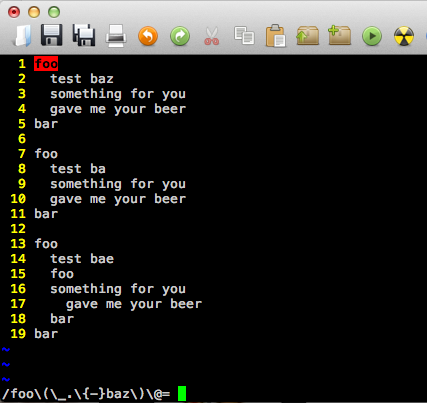
The command of searching for
foo...bar loop not containing 'baz':/foo\(\_.\{-}baz\)\@!\_.\{-}bar
Search for the most inner
foo...bar block command:/foo\(\_.\{-}foo\_.\{-}bar\)\@!\_.\{-}bar
Sometimes, I want to add line break tags to the end of a line, but not to the empty lines. This command can be used to add
<br /><br /> to the end of any none-empty lines::%s:.\@<=$:<br/><br/>:g

The next example is a very useful one. I often use VIM convert program codes into HTML format. Some times, I need to convert a group of spaces into
s, except the first space. This is an excellent case to use lookahead zero width assertion. I figure it out and it becomes my favorite the search and replace commands./\(\s\)\@<=\(\s\)\+

After examining the results, I use the following replacement command to do the conversion:
:%s:\s\@<=\s:\ :g

Reference
- My previous bog: VIM Tip: Not Containing Pattern(2)
Friday, April 06, 2012
VIM Tip: Not Containing Pattern (2)
I think that I figure it out now, but it took me a while to google and digest the related information. I think it is worthwhile to study this. I am writing this blog to summarize my findings.
Lookahead and Lookbehand Zero-width Assertions
At first I thought about match a pattern not containing another pattern should be as simple as using a negate or ! operator to identify not-containing-pattern. There may be a not operator in VIM search, but I could not find it. What I found is Lookaround Zero-width Assertion.
In VIM, the way of search for a pattern not containing another pattern is very smart and elegant. The basic search is to find all matched patterns, and the matched items are returned as results. In VIM, the following is a search command:
/PATTERNthe pattern can be a regular expression.
In VIM,
zero width pattern is a pattern to be matched but not in the search results. Think zero width pattern as additional match condition, it can be described as either of following ways:PATTREN + ZERO_WIDTH_ATOM orZERO_WIDTH_ATOM + PATTERNThe first one is called as lookahead zero width assertion, and second one as lookbehind zero width assertion. Assertion here means matched or not matched. The above two are positive assertions. If we take negative or not matched into consideration, there are four types of look around with zero width assertions. They are:
/PATTERN[ZERO_WIDTH_ATOM\@=]/PATTERN[ZERO_WIDTH_ATOM\@!]/[ZERO_WIDTH_ATOM\@<=]PATTERN/[ZERO_WIDTH_ATOM\@<!]PATTERNNote: [...] is used as optional and also as separator from pattern, [ or ] are not part of search.
As my understanding, VIM uses symbolic like character for look around. As other special characters in VIM, \ is used to indicate look around with zero width assertion. The following table summarizes characters used for this type of search:
| \@ | indicate lookahead |
| \@< | lookbehind |
| = | positive match |
| ! | negative or not match. |
In above searches,
PATTERN is to be matched. If ZERO_WIDTH_ATOM is supplied, it will be used as additional assertion. If there is any match, the matched pattern items will be returned as results, but ZERO_WIDTH_ATOM is not in the results. That's why it called as zero width.According to VIM documentation, the definition of ATOM is a character, or a character class, or a group (indicated by \(...\) braces).
Think the Search as a Program
Lets think those type of searches as a program. Here I have the following c-style pseudo codes:
Results getMatchedResults(
   string context,               // basic
   string pattern,
   string zero_width_pattern,    // zero_width pattern
   bool match_zero_width_pattern,
   bool lookahead)
{
  results = EMPTY_LIST;
  result = getMatchedResult(context, pattern);
  while (result != EMPTY)
  {
    if (zero_pattern != EMPTY)
    {
      if ( lookahead ) {
        context_tmp = getNextContextByLookahead(context, result);
        result_tmp = getMatchedResult(context_tmp, zero_width_pattern);
      } else {
        context_tmp = getNextContextByLookbehind(context, result);
        result_tmp = getMatchedResultByLookbehind(context_tmp,
                       zero_width_pattern);
      }
      if ( result_tmp == EMPTY ) {
        if (match_zero_width_pattern) {
          result = EMPTY;
        }
      } else {
        if (!match_zero_width_pattern) {
          retult = EMPTY;
        }
      }
    }
    if ( result != EMPTY ) {
      results.add(result);
      context = geNextContextByLookahread(context, result);
      result = getMatchedResult(context, pattern);
    }
  }
  return results;
}
The pseudo codes are very straightforward. Actually, VIM search is based on Regex as its search engine. The above search expression commands are basic Regex patterns.
References
- VIM Tip: Not Containing Pattern (1)
- VIM Doc: pattern and zero width
- René article on VIM Search
- Regular-Expression.Info: Lookahead and Lookbehind Assertions
- Next blog: VIM Tip: Not Containing Pattern (3)
Sunday, April 01, 2012
Steps to Delegate in iOS
He talked the confusion for new developers when they use protocols. The 5 steps are clear explanation on how to use and implement protocols. He also showed the steps in his demo.

- Create the @protocol
- Add delegate @property to delegator's public @interface
- Use delegate property inside delegator's implementation
- Set the delegate property somewhere inside the delegate's @implmentation
- Implement the protocol's method(s) in the delegate(include <> on @interface)

@class CalculatorProgramsTableViewController;

@protocol CalculatorProgramsTableViewControllerDelegate

@optional
- (void)calculatorProgramsTableViewController:(CalculatorPorgramTableViewController *)sender
                                 choseProgram:(id)program;
@end
In CalculatorProgramsTableViewController.h, the delegate is created in the controller as weak id <...> delegate:
@interface CalculatorProgramsTableViewController : UITableViewController
...
// Define a property delegate
@property (nonatomic, weak) id<CalculatorProgramsTableViewControlerDelegate> delegate;
...
@end
In its .m file, the delegate property is defined by @synthesize delegate = _delegate.
@implementation CalculatorProgramsTableViewController
...
@synthesize delegate = _delegate;
...
@end
In the event of a row cell being selected, the delegate is used:
#progma mark - UITableViewDelegate

- (void)tableView:(UITableView *)tableView
    didSeelectRowAtIndexPath:(NSIndexPath *)indexPath
{
  id program = [self.programs objectAtIndex:indexPath.row];
  [self.delegate calculatorProgramsTableViewController:self
                                          choseProgram:porgram];
}
Next, where the delegate is set? in the event of controller segue. The delegate method is implemented in the controller:
@implementation CalculatorGraphViewController
...
- (void)prepareForSegue:(UIStoryboardSegue *)segue
                 sender:(id)sender
{
  if ([segue.identifier isEqualToString:@"Show Favorite Graphics"]) {
    NSArray * programs = [[NSUserDefaults standardUserDefaults]
      objectForKey:FAVORITES_KEY];
    [segue.destinationViewController setPrograms:programs];
    [segue.destinationViewController setDelegate:self]; // set delegate
  }
}
Lastly, in order for the graphic view controller to know the change of a program, the controller has to implement the delegate method. The protocol method will be called when the delegate sends out its message: a row in table view being selected:
// in .h file, the protocal delegate is defined as the controller's interface
@interface CalculatorGraphViewController : NSOjbect
             <CalculatorProgramsTableViewControllerDelegate>
...
@end

//In .m The protocol method is implemented
- (void)calculatorProgramsTableViewController:(CalculatorProgramsTableViewController *)sender
                                chooseProgram:(id)program
{
  self.calculatorProgram = program;
}
"That's all we need. OK!", Paul said.
References
- Pauls' blog at SU
- In iTunes: iPad and iPhone Application Development, Fall 2011
- My post to SA question about iOS delegate
Saturday, March 24, 2012
VIM Tip: Not Containing Pattern (1)
I decided to use VIM Search and Replace feature to do the job. Since my search is case insensitive, first, I use the following command to tell VIM to ignore case for my search:
:set ignorecaseThen I used the following search pattern:
/tablesapce\s\+\(t\w\+\)\@!This search is for any line containing word "tablespace" following any spaces, but the following word beginning with "t". The following table explains some special characters in VIM:
| Item | Description |
|---|---|
\s | whitespace character |
\+ | matches 1 or more of the preceding characters... |
\(...\) | enclosing a pattern as a group. |
\w | work character |
\@! | not containing |
\n | the matched pattern in the n pair of \(\), for example, \1 for the first matched group \(\). |
Here I used group pattern with containing trick
"\@!", which means that the word in the group does not contain a word beginning with "t". In my case, "tmp" is an example.
After I verified that the search result meets my requirement. The replace is used:
%s/\(tablespace\s\+\)\(t\w\+\)\@!/\1MyTablespace/gi\1 is the matched the group 1, i.e., "tablespace" plus white space. Here gi means global and ignore case.References
- Wikia: VIM Tip: Find lines not matching pattern
- VIM Regular Expressions 101
- Next blog: VIM Tip: Not Containing Pattern (2)
Saturday, March 17, 2012
Add Wolfram|Alpha Query Box in Blog
From WA web page, I find a link about how to add WA to blog or web sites. The HTML script is very simple one. There are serval sizes available. Here is an example to add a small size WA:
1 <script id="WolframAlphaScript"
2   src="http://www.wolframalpha.com/input/embed/?type=medium"
3   type="text/javascript">
4 </script>
Here is what it looks like:
However, I could not find a way to put a query text into the WA input box directly. In WA, you can type a query text there, for example, pi. From there, I can get a URL about the query:
http://www.wolframalpha.com/input/?i=pi
As a result, an alternative way to add a WA query is to add a link with a query text:
Query: pi

References
- Woflram: Add WA to your site
- Mathematica
Saturday, March 10, 2012
CodeRetreat and Corey Haines
 His story impressed me. That's quite adventure way to update development skills. After I left his job in 2009, he started his one-year journey cross US, pair programming for a room and board. He mentioned in the .Net Rocks interview that he mention various people, include some gurus. I think that that year he learned a lot. Just like in his web page, he was like "a bee" to suck knowledge and development skills from people. Even at times he was working with people at the same or less level as him, he still practiced his presentation and personal skills. I think he was single at the that time.
I sent him a tweet to ask if he was the person on the .Net Rock podcast after the talk. I have never got his reply. That's OK. I knew that was him. Since then(by the end of 2009), I have not heard anything about him.
It was a refreshing news when I heard him again on Hanselminutes. This time, Corey talked about his project of code retreat. Basically, it is a kind intensive training, one whole day. A group of people repeat about 5 rounds of 45 minute pair programming focusing one specific problem. I really like this kind of project. I joined his coderereat organization on the same day after the podcast (in the evening).
I think that the project of coderetreat is a continuing and extension of his journeyman of programming. The journeyman was just one-to-one experience. Now he extends it to group of people.
In addition to his talk about coderettreat project, I found that he has been actively providing consulting services, talks, and some projects. In his web page, there are two web-based projects: MercuryApp and Slottd. MercuryApp provides a tracking service for any thing. Basically you score your feeling about project, word, thing or anything else. If you keep entering scores over a period of time, you may gain a view over the item you have tracked. You need to create an account with your email.

Slottd is a simple scheduler web service. You don't need an account to use. However, you do need to provide an email for your to update your schedule later one. For example, I created one meeting for the next Monday with 2 spots available. After the schedule is created, you will get two temporary URLs by email: one for update and another one for people to take the spot. It is a simple idea and quite useful. I think that this service might be a result of their code retreat projects.

All those web services are simple ones, but they are great examples to work together. Within a short period of time, a team work on the project in Agile. Every one will learn from it by hands-on-codeing.
Another developer who has great impact on programming skills and my life is Jean-Paul Sylvain Boodhoo. When I was working as a consultant at Bantrel, JP was invited to provide one week training on .Net with TDD. That was great training. Even during the day I had to work(no contractors were invited for free), I went to the training session after work 5:00pm immediately. He was so passionate with the training. He should finish by 5:00PM, but he just went to late 9:00PM, even 11:00PM. That experience fired my up. Since then I started to keep my skills update to date with my passion.
Not sure if there are any one in Calgary area like to form a similar project. The start may have just couple of developers. This kind of activity will tremendously benefit development skills for sure.
References
- Hanselmunites: Software Craftsmanship and Code Retreats with Corey Haines
- Code Retreat Web Page
- Corey Haines on .Net Rocks podcasts: Corey Haines on Software Crasftmanship
- Previous talk on .Net Rocks on Code Retreat Globally
- Corey Haines Web Page
- Project: MercuryApp
- Project: Slottd
- JP's blog: Develop With Passion
Thursday, March 08, 2012
More on XSLT Transformation
The previous example is based on an XML file from my SQL Server Profiler tracing result: I want to convert all the interested Column nodes under Event into a HTML table. Last week, I realized that all those events can be further divided into three SQL groups based on SQL calls: Current, Data and TagInfo. It would be nice if I could create three HTML tables to summarize those results. I spent some time to explore more on XSLT transformation. The following are some related transformation elements I used.
XSL Variables
In XSL, variables can be defined for reuse. I need three HTML tables. Each has the same headers and footers. I found that by defining variables, it is a very neat strategy to create my HTML tables with constant herder and footer.
  <xsl:variable name="header">
    <tr bgcolor="#9acd32">
      <th>Row index</th>
      <th>CPU</th>
      <th>Reads</th>
      <th>Duration</th>
      <th>Writes</th>
    </tr>
  </xsl:variable>
  <xsl:variable name="footer">
    <tr bgcolor="#9acd32">
      <th>Total</th>
      <th></th>
      <th></th>
      <th></th>
      <th></th>
    </tr>
  </xsl:variable>
Here are variables: header and footer, each corresponding to HTML table header and footer sections.
In the next section, you will see how those variables are used.
One limitation of XSLT variables is that they are immutable. That means you cannot change value after a variable is defined or created. I would like to have some variables to sum all CPU, Reads, Duration values, but I could not figure out how. My solution is to copy my HMLT table results and paste them to Excel to do the calculation.
XSLT If Element
I used XSLT
If element as a predicate for my HMTL table content:<table border="1"> <xsl:copy-of select="$header"></xsl:copy-of> <xsl:for-each select="TraceData/Events/Event[@name='SQL:BatchCompleted']"> <xsl:if test="starts-with(Column[@name='TextData'], 'EXEC sp_PVSQL_Template_MANUAL_Data')"> <tr> <td> <xsl:value-of select="position()" /> </td> <td> <xsl:value-of select="Column[@name='CPU']" /> </td> <td> <xsl:value-of select="Column[@name='Reads']" /> </td> <td> <xsl:value-of select="Column[@name='Duration']" /> </td> <td> <xsl:value-of select="Column[@name='Writes']" /> </td> </tr> </xsl:if> </xsl:for-each> <xsl:copy-of select="$footer"></xsl:copy-of> </table>
The above codes also show the usage of my XSLT variables for my HTML header and footer sections.
XSLT Functions
In above codes, I used an XSLT function in XSLT
If test: starts_with(a, b). This is a useful string function to check if string a starts with b string, case sensitive. The function of position() is used to get XML Row index, which is a reference node position in the original XML content.However, the parameters of the function have to be in the correct case, case sensitive. I tried to use
lower_case() and match() function. Unfortunately, those functions are only available in XSLT 2.0. The tool of XML Notepad does not support XSLT 2.0, nor I can find updates for the tool.References
- W3Schools: XSLT <xsl:variable> Element
- W3Schools: XSLT <xls:if >: Element
- W3Schools: XSLT Functions
- Complete Example XSL file at Google Project Site
Sunday, February 26, 2012
Using XSLT and XPath to Transform XML
What I was interested are columns of CPU, Reads, Writes and Duration. I need to convert those information into a HTML format so that I can copy and paste them to Excel. I could use PowerShell, Javascript, write .Net program to do the job, but I decided to recall my previous skills. This has been great experience for me. The following are the main steps.
XML File
The XML file is the source of data. In my example case, I used SQL Server Profiler tool to get data communication from an application to a SQL server. All those information are recorded as data of events.

The SQL Server Profile provides a way to save the result to XML file:

I opened the XML file in notepad. The columns of CPU, Reads, Writes, and Durations are in a node of Event with attribute name="SQL:BatchCompleted". The path of Event is TracedData\Events\Event. Under the Event node, there is collection of Column nodes. Each Column has an attribute name as its identity, and my interested Column nodes are name="CPU", "Reads", "Writes" and "Durations".
Using XSLT and XPath
Last time I learned XLST and XPath were at W3Schools. The information are still there. XLST is the basic tool to do a transformation. Within the XLST, XPath is used to search for or match XML nodes.
<?xml version="1.0" encoding="ISO-8859-1"?>
<xsl:stylesheet version="1.0"
xmlns:xsl="http://www.w3.org/1999/XSL/Transform">

<xsl:template match="/">
<html>
  <body>
    <form method="post" action="edittool.asp">
    <h2>SQL Server Profiler Result</h2>
    <table border="1">
      <tr bgcolor="#9acd32">
        <th>CPU</th>
        <th>Reads</th>
        <th>Duration</th>
        <th>Writes</th>
      </tr>
      <xsl:for-each select="TraceData/Events/Event[@name='SQL:BatchCompleted']">
      <tr>
        <td>
          <xsl:value-of select="Column[@name='CPU']"/>
        </td>
        <td>
          <xsl:value-of select="Column[@name='Reads']"/>
        </td>
        <td>
          <xsl:value-of select="Column[@name='Duration']"/>
        </td>
        <td>
          <xsl:value-of select="Column[@name='Writes']"/>
        </td>
      </tr>
      </xsl:for-each>
    </table>
  </form>
  </body>
</html>
</xsl:template>
</xsl:stylesheet>
To get all the nodes of Event with attribute
name="SQL:BatchCompleted", I use XSL:for-each select syntax to loop the collection. Then I use XSL:value-of to get Column node's value. To specify CPU Column, I used XPath Predicate [@attributename...] syntax. For example, Column[@name='CPU'] is to specify Column node with attribute name with 'CPU' value.Using Browser to View Results
What I like to do the transformation is simply using a browser, dragging XML file to a browser to display results as HTML content. I don't like to put XML and XSLT to a web server to get the same result.
Add a line to XML to specify XLST transformation at the beginning:
<?xml version="1.0" encoding="utf-16"?>
<?xml-stylesheet type="text/xsl" href="cdcatalog.xsl"?>
This line will add a link of an XSL style sheet to an XML document.
To my surprise, I saw no result in Chrome. The content was blank! By enabling Inspect Element form browser's context menu, I found that actually this was a security issue:


-disable-web-security.
You have to close all the current Chrome instances before launching this one. With this command option, my XML was then transformed and displayed in Chrome browser.

10 years ago, I was using IE to display the transformation. IE still works fine today. I think this makes sense. The URL of the XML file is actually local file:
file:///E:.... The link in XML to a XSL file should be able accessible locally in browser.
XML NotePad Tool
I have a favorite tool for viewing XML file: XML Notepad. During the time I was using browser to view transformed XML file, I found that XML Notepad has a build in function to do that.

In the second tab, XML Output, I realized that it let use to choose a XSL file to transform the XML file.

References
- W3Schools: XSLT Transformation
- Peter Beverloo blog: List of Chromium Command Line Switches
- Microsoft: XML Notepad Download
Friday, February 17, 2012
Some Views Cannot be Matertialized
However, this time I could not make my updated views as materialized ones. After further analysis, I realize that this is not SQL's fault. If a view has some dynamic components, such as columns, the view just cannot cache data. In this sense, the view cannot be materialized.
For the following SQL SELECT is one example:
SELECT ID, CAST(@StartDate + ' ' + @StartTime AS DATETIME) AS DT, VALUE
FROM MyTable;
Since the column
DT is dynamically built by two variables, SQL server just cannot cache data.My assignment actually is much more complicated than this case. The strategy I worked out was to stand back first. I tried to understand the application SQL templates. What kind of data are queried? Based on my understanding, I tried to create a set of database tables to meet the requirement. Then I added triggers to source data tables to populate data from the source to the new tables. As a result, the views as SQL templates were much easy to build.
What I learned from this project is that you cannot always implement one strategy to solve all the problems, even though the implementation strategy has been successfully used before. If it is too hard to use the same strategy, you have to stand back, re-think the issue in a wide prospective view, and try to take alternative path. This may actually lead to find another good solution.
Sunday, February 12, 2012
Web service: Wolfram|Alpha
 I was suppressed to know the web service of Wolfram|Alpha, a computable knowledge engine. I knew this one by aan article of AppleInsider about 1/4 Siri searching result from Wolfram|Alpha.
Unlike the search by Google, the results are collection of web pages or resources based on a query's relevance or top hits. The inventor Stephen Wolfram said that Wolfram|Alpha is not a search engine. Instead, it is a computable knowledge engine which provides results from its back-end computer system, Methematica, with curated data.
After the initial discovery, I was fascinated with this idea of combining math, computer program, data and systematic experiments. For me this is a new idea, but Stephen has spent his 30 year research on this. At the time I found this service, Wolfram|Alpha was in the trial stage and soon two days ago the Pro is out.
Based on the information, the structure of this web service is composed of four basic blocks:

Since the results are computed and presented as a list of graphics, tables, and explanations, there are no source information. In this sense, this web service is not a replacement for Google server, but a quite nice complement. I have tried to search for some code solutions but with no actually any results. I hope the future version may provide nice solutions as well.
References
- Wolfram|Alpha
- AppleInsider article: Siri accounts for 1/4 of Wolfram Alpha queries as search engine goes 'Pro'
- YouTube: Part 1: Original Intro to Wolfram|Alpha by Stephen Wolfram
- TED show: Stephen Wolfram: Scientist, inventor
- TED show: Conrad Wolfram: Mathematician
- Wikipedia: A New Kind of Science
Saturday, February 04, 2012
How to create a login page using ASP.NET MVC 3 Razor
I am back to MVC project. I used MVC for web application long time ago when it was still in Microsoft Patterns & Practice development. Now it is part of .Net 3.5 and 4.0 framework and all the classes and templates are available in Visual Studio 2011.
I need to add a Login page to my project. The way I did in my ASP.Net is quite different from the way in MVC. Since MVC has been changed a lot in terms of structure and framework, I have to learn MVC again. The MVC templates created by Visual Studio 2010 do not have Login feature. Fortunately, I found this tutorial on Youtube in short time:
- How to create a login page using ASP.NET MVC 3 Razor (5 part serials)
First, add restriction in web.config file with Location element:
<configuration>
   <location path="">
      <system.web>
         <authorization>
            <deny users="?"/>
         </authorization>
      </system.web>
   </location>
</configuration>
The above will disable access to all the pages in the site. Then add authentication element for login page in web.config:
<authentication mode="Forms">
  <forms loginUrl="~/Login/Login.aspx" timeout="120" />
</authentication>
In order to ensure the authentication in other web pages, a cooky is added before redirect to other forms on server side, as an indication been authenticated (part 3):
FormsAuthendication.SetAuthCookies(key, persistent);
In the place where log out is implemented, the following code is used to clear the cookie (part 4):
FormsAuthendication.SignOut();
That's all the basics.
In addition to those steps, the tutorial explains master page in MVC, which is in the Views->Shared folder. Different master pages can be specified (part 4). One interesting thing in MVC is that cs and html are all in one source code file as cshtml extension.
The tutorial also explains some very basic concepts in MVC:
- Router structure in Global.assax (part 1)
- Model for a view (part 5)
- Get and Post actions mapping to View's methods
Saturday, January 28, 2012
iOS Training Cource by Stanford University
I wrote the following blog while I was in Wuhan, China, during my vacation. For some reason, I could not access to my blogger there. I had to write my blogs in my sina blog. Now I copy the blog back to my programming blog.
I had to write my English blog at Sina blog web site since the Blogger is not accessible, during my visit to my extended family in Beijing and Wuhan. Fortunately, I have a Sina blog account so that I can continue to write my blog. I'll copy this blog to my Blogger when I get back.
Before I left for China, I found that iOS training by Stanford
University(SU) was released. This is fall session course, started
being published in Nov 2012. SU started to provide iPhone training
courses several years ago, and I watched all the past iPhone
training courses. I enjoy watching those courses very much. Even
the course is an entry program for developers about iPhone
application and Objective-C, the content has been kept up with the
update of iOS. Based on the techniques and knowledge I learned from
the course, I started my iPhone application development. I have to
say that SU's course helps me a lot.
I think that SU's training course was one of a few educational
programs for iPhone development and Obective-C. I greatly
appreciate the updated content of the course along with the iOS
progress. This time, the SU's iOS course has so many new contents
about iOS 5. This course is quite different from the previous ones.
For example, there is no more memory management by keeping track of
reference counts. The XCODE is based on the new version of XCODE 4.
The storyboard is included in the course as well. I think this
course is a must-watch program for every iPhone and iPad
developer.
I like the instructor, Paul Hegarty, very much. He started to
teach this course last year. In this training, during the date
Steve Jobs passed away, he revealed that he was in part of Steve
Jobs' NeXT computer team in the early years. Later on he moved to
University to teach computer courses. He is very knowledgable in
Mac and iOS development.
I have downloaded all available classes before my leave from
iTunes U. Now (Jan 7, 2012) I finished about 7 classes.
It seems that all those courses are available in iTunes U in
China. The iTunes U course is in two formats: one in SD and another
in HD. There is big difference in size. HD, in hight definition,
takes a lot of spaces and thence takes too long time to download.
For me, it is just a course to learn new things, and most likely I
would not watch it again. Therefore, I would recommend to download
the SD serials instead. Search for "iPhone" in iTunes to find SD
serials.

References
Sunday, January 15, 2012
Two ASP.Net Tips
I will be on vacation to China and be back on Jan 15, 2012. Since the Blogger is not accessible from China, I have to schedule my blog so that I will keep my promise to write at least one blog per week. This blog is a scheduled post.
This is note on two tips I found in ASP.Net.
Bind Field with Object Method
It is very common to bind a field to an object's property value. However, I find out one case that I prefer to bind a field with the object's method. The advantage of binding to a method is that I can pass parameter values in. I found a solution from SO.
Here is my example:
<asp:RequiredFieldValidator
ID="RequiredFieldValidator1"
runat="server"
ControlToValidate="txtValue1"
Visible='<%#((MyData) Container.DataItem).RawValueAvailable(1) %>'
ErrorMessage="Value cannot be empty">*
</asp:RequiredFieldValidator>
I need to add required validation control with a condition if there is value for the bound object. The above example sets Visible with the method "RawValueAvailable(..) of the bound object of MyData. It works great.
Set Login Timeout
<system.web>
  <authenticationmode="Forms">
    <formstimeout="50"/>
  </authentication>
  <sessionStatetimeout="60"  />
</system.web>
Setting the forms timeout to something less than the session timeout can give the user a window in which to log back in without losing any session data. However, I think that client side cached data will be gone if redirect is called. For example, if a user enters several data into a data grid view, the changed data may be lost if login timeout is passed. There may be a way to provide warning for saving data by using Javascripts.
References
Tuesday, January 03, 2012
Interesting Discovery of float.Parse()
I found some thing really interesting about float.Parse() method. Normally, I thought this parse method should be able to convert any numeric string to a float value, as long as it does not cause overflow. However, I found that it does not really faithfully do the conversion. If the string value is too small or too big, you may lost some precision in value.
Here I tried to narrow down this issue to a test program:
private static void TestFloat() {
  for (int index = 1; index < 10; index++)
  {
      string val = string.Format("{0}.123456", new string('8', index));
      float f = float.Parse(val);
      string sF = f.ToString();
      string sF1 = f.ToString("0.000000");
      Console.WriteLine(@"string value: {0}(len: {5}); float value: {1}(len: {6}-{7});
string to float.Tostring()    {0}=={1}? {3};
string to float.Tostring(xxx) {0}=={2}? {4}",
       val, f, sF1, val.Equals(sF), val.Equals(sF1), val.Length, sF.Length, sF1.Length);
  }
}
The result is very surprising:
string value: 8.123456(len: 8); float value: 8.123456(len: 8-8);
  string to float.Tostring()    8.123456==8.123456? True;
  string to float.Tostring(xxx) 8.123456==8.123456? True
string value: 88.123456(len: 9); float value: 88.12346(len: 8-9);
  string to float.Tostring()    88.123456==88.12346? False;
  string to float.Tostring(xxx) 88.123456==88.123460? False
string value: 888.123456(len: 10); float value: 888.1235(len: 8-10);
  string to float.Tostring()    888.123456==888.1235? False;
  string to float.Tostring(xxx) 888.123456==888.123500? False
string value: 8888.123456(len: 11); float value: 8888.123(len: 8-11);
  string to float.Tostring()    8888.123456==8888.123? False;
  string to float.Tostring(xxx) 8888.123456==8888.123000? False
string value: 88888.123456(len: 12); float value: 88888.13(len: 8-12);
  string to float.Tostring()    88888.123456==88888.13? False;
  string to float.Tostring(xxx) 88888.123456==88888.130000? False
string value: 888888.123456(len: 13); float value: 888888.1(len: 8-13);
  string to float.Tostring()    888888.123456==888888.1? False;
  string to float.Tostring(xxx) 888888.123456==888888.100000? False
string value: 8888888.123456(len: 14); float value: 8888888(len: 7-14);
  string to float.Tostring()    8888888.123456==8888888? False;
  string to float.Tostring(xxx) 8888888.123456==8888888.000000? False
string value: 88888888.123456(len: 15); float value: 8.888889E+07(len: 12-15);
  string to float.Tostring()    88888888.123456==8.888889E+07? False;
  string to float.Tostring(xxx) 88888888.123456==88888890.000000? False
string value: 888888888.123456(len: 16); float value: 8.888889E+08(len: 12-16);
  string to float.Tostring()    888888888.123456==8.888889E+08? False;
  string to float.Tostring(xxx) 888888888.123456==888888900.000000? False
To my discovery, the parsed result lost its precision, 9 out of 10!
I found this issue when I tried to take an input string from a text box, convert it to a float value and finally save to database. My tester found that the results are not consistent when value is too big. At the beginning I did not believe it, but after I repeated the case, I found the bizarre result. Finally I realized the issue is caused by Parse() method.
Any way to get around this issue? It seems there is no way to save the exactly value to database. Even I can save the value as a string to database, eventually, it may reach a point that database will present the value as xxxEzz format, which may lost precision when the value is retrieved back.
It looks like that we have to limit values to be entered, to a realistic range. Then handle the value from UI to database or vice visa.
This blog is published by schedule.
Sunday, January 01, 2012
Tips for Better 2012
This is a scheduled post. I got the following tips from my friend in a PPS show. I like it very much. Instead of chaining the email to others, here I put it in my blog.
- Take a 10-30 minutes walk every day and while you walk, smile.
- Sit in silence for at least 10 minutes each day.
- Sleep for 7 hours
- Live with the 3E's Energy, Enthusiasm, and Empathy.
- Play for more games.
- Read more books than you did in 2011.
- Drink plenty of water
- Eat more foods that grow on trees and plants and eat less food that is manufactured in plants.
- Eat breakfast like a king, lunch like a prince, and dinner like a beggar.
- Make time to practice meditation, yoga, and prayer. They provides us with daily fuel for our busy lives.
- Dream more while you are awake.
- Smile and laugh more.
- Try to make at least three people smile each day.
- Don't waste your previous energy on gossip.
- Don't have negative thoughts or things you cannot control. Instead invest your energy in the positive present moment.
- Spend time with people over the age of 70 & under the age of 6.
- Life is too short to waste time hating anyone. Don't hate others.
- Don't take yourself so seriously. No one else does.
- Forget issues of the past. Don't remind your partner with his/her mistakes of the past. That will ruin your present happiness.
- Realize that life is a school and you are here to learn. Problems are simply part of the curriculum that appear and fade away like algebra class, but the lessons you learn will last a lifetime.
- You don't have to win every argument. Agree to disagree.
- Don't compare your life to others'. You have no idea what their journey is all about. Don't compare your partner with others.
- Make peace with your past so it won't spoil the present.
- Your job won't take care of you when you are sick. Your friends will. Stay in touch.
- Forgive everyone for everything.
- What other people think of you is none of your business.
- However good or bad a situation is, it will change.
- Get rid of anything that isn't useful, beautiful or joyful.
- Envy is a waste of time. You already have all you need.
- The best is yet to come.
- No matter how you feel, get up, dress up and show up.
- Don't over do. Keep your limits.
- Your inner most is always happy. So be happy.
- Do the right thing!
- Call your family often.
- Each day give something good to others.
Sunday, December 25, 2011
Great Year 2011, and Welcome to 2012
It is time to close to the end of Year 2011. At the time this blog is published, I am on my way to China to visit my mother, sister and brother.
This is another great year for me. I finished my contact for 2011 at Husky Energy and I'll move to development team for another year. Even though I have done not much programming this year, I have learned so much by provide application support. This has been great experience to learn much more about applications, by using application, trouble shooting issues, and providing helps to gain better understanding of applications created by other people and companies.
I think to extend knowledge to a wide range is very important. You will never know when those skills and knowledge will be useful. My past experiences with a wide range of stuff benefit so much. This has been proved in my work in 2011. In so many cases, my past knowledge in SQL, Oracle, OPC, Windows System, programming knowledge in .Net, UNIX, even VI has helped me a lot. Never stop learning and never say no something you don't know. Face the challenge and invest your time and effort, as well as keeping the habit to learn something new. All those inputs will bring great results in long run for sure.
My Apple development has no progress at all in 2011; however, I did spend time to finish all the WWDC videos. The reason I don't have time on iOS app development is that I just don't have time. I have changed my focus in another none-programming area and put a lots of my time and effort on my Chinese blog. This is another sharing experience and I think it is important for me to do. In this area, I have set up a solid and great start up. When I settle down in this area, I'll go back my iOS and Mac app development. Actually, I will find some interesting and great potential topics to work on.
My next year contract will be also full of challenges and new opportunities. In the past month I have been working on an ASP.Net project based on .Net framework 2.0. The next version will be on .Net 4.0 with MVC, and Infragistics tools. I am exited and looking forward to taking the challenge.
However, I think my .Net knowledge and skills are up to the comfort level for me to stay for a while. My next territory will be in Apple's iOS and Mac. I have laid solid foundation. I'll continue to head in to the new area with passion.
As always, this blog will my sharing land to mature my programming experiences. It'll be very valuable to overview my trace in the feature. Let me leave my deep and clear foot prints. I'm sure it will enjoyable time to read myself.
Sunday, December 18, 2011
Using LDAP to Authenticate Windows Users
Here are some my programming notes about using LDAP library to authenticate Windows Users.
This request came from my ASP.Net project, which is hosted on intranet IIS server. The first login page is to authenticate Windows users in the company. I need a library to do the job. I tried some codes created long time before, but I found that the codes is not completed. The authentication works only in Visual Studio, but not at an IIS server after deployment. I need to fix the issue.
I found that there are many ways to do that. One is based on our existing codes with Novel.Directory.Ldap library, another on System.DirectoryServices. I tried both in one test console application.
Here some some references and constants used in the console application:
using System;
using Novell.Directory.Ldap;
using System.Collections.Generic;
using System.DirectoryServices;
using System.DirectoryServices.Protocols;
using AD_LdapConnection = System.DirectoryServices.Protocols.LdapConnection;
using ND_LdapConnection = Novell.Directory.Ldap.LdapConnection;
using System.Net;
...
private const string LDAPHOST = "xxxx.yy.zzzz.com";
private const int LDAPPORT = 389;
private const string DOMAINNAME = "yy";
private const string CN_NAME_SUFIX = "@yy.zzzz.com";
Novel.Directory.Ldap
The first one is base on Novel.Directory.Ldap:
private static bool Authenticate(string username, string pwd)
{
  bool bRet = false;
  bool connected = false;

  // connect to LDAP server
  ND_LdapConnection ldapConnLogin = new ND_LdapConnection();
  try
  {
    Console.WriteLine("Start authenticating...\nConnecting to {0}, port: {1}",
      LDAPHOST, LDAPPORT);
    ldapConnLogin.Connect(LDAPHOST, LDAPPORT);
    connected = ldapConnLogin.Connected;
    if (connected)
    {
      Console.WriteLine("Connected: {0}", connected);

      string cn = string.Format(
        "{0}{1}", username, CN_NAME_SUFFIX);
      Console.WriteLine("Binding with {0}", cn);
      ldapConnLogin.Bind(cn, pwd);
      bRet = ldapConnLogin.Bound;
      Console.WriteLine("Bound: {1}", bRet);
    }
  }
  catch (Exception ex)
  {
    string msg = string.Format(" Error message or code: {0}", ex.Message);

    Console.WriteLine(msg);
    bRet = false;
  }
  finally
  {
    if (ldapConnLogin != null && connected)
    {
      ldapConnLogin.Disconnect();
    }
    ldapConnLogin = null;
  }

  return bRet;
}
This methods depends on ldap host name, port number, and cn name(in a format like email address in our company). One thing interesting is that the exception thrown from the binding call are error codes in Message, and no implementation of ToString() method.
System.DirectoryServices
The second method is Microsoft .Net library APIs in System.DirectoryServices. The following codes are much simpler and works in the same way to authenticate a Windows user:
private static bool Authendicate2(string domain, string userName, string password)
{
  bool validation = false;
  try
  {
    Console.WriteLine("Authenticating user by AD library...");
    var ldc = new AD_LdapConnection(
        new LdapDirectoryIdentifier(LDAPHOST, false, false));
    NetworkCredential nc = new NetworkCredential(userName, password, domain);
    Console.WriteLine("Created credencial object.");
    ldc.Credential = nc;
    ldc.AuthType = AuthType.Negotiate;
    Console.WriteLine("Binding credencial...");
    ldc.Bind(nc);
    // user has authenticated at this point, as the credentials were used to login to the dc.
    Console.WriteLine("Binding credencial is done.");
    validation = true;
  }
  catch (Exception ex)
  {
    Console.WriteLine("Exception: {0}", ex.Message);
    validation = false;
  }
  return validation;
}
References
- Setting up Novell LDAP Library for C#
- LDAP Error codes
- SO: LDAP Authentication in APS.Net MVC, by user99513
Subscribe to:
Posts (Atom)

 Posts
Posts

